Best Smartphone for Business in 2026: What IT teams should buy for work and company-issued fleets

The best smartphone for business is rarely the one that wins the camera comparison. For an individual buyer, the spec sheet decides. For an organization issuing phones to a team of ten, a hundred, or a thousand, the decision turns on different factors: which device enrolls cleanly into management, how long it receives security updates, how well it separates work data from personal data, and how much it costs to run over three to five years. This guide is written for the IT team making that company-issued fleet decision.
Most best-phone roundups rank devices for individual consumers, optimizing for camera, display, and gaming performance. Those factors matter far less to an IT team standing up a fleet, where enrollment support, update commitment, security framework, and manageability decide the real cost of ownership. This post ranks the leading work smartphones by fleet fitness across Apple and Android, then covers how IT actually manages a company-issued fleet once it is deployed.
One useful clarification, because the terms are ambiguous. This guide is about the physical smartphones that a business issues to employees (sometimes searched for as the best cell phone for business or the best work phone) and manages through a Mobile Device Management (MDM) platform. It is not about business phone systems, VoIP, or virtual phone numbers, which are a separate category. If the question is which handset to hand an employee, this is the guide.
How to choose a business smartphone: the criteria that matter for fleets
The best smartphone for business is chosen against fleet criteria, not consumer ones. Six factors decide fleet fitness, weighted differently than they would be for a personal purchase.
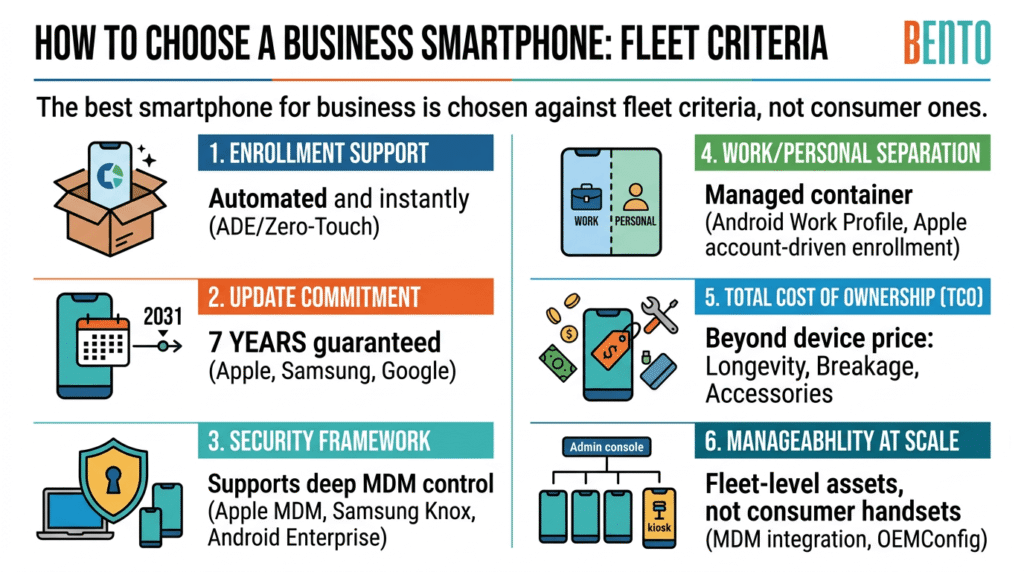
Enrollment support. Can the phone enroll into management automatically at first boot? Apple devices use Automated Device Enrollment through Apple Business Manager. Android devices use Android Zero-Touch or Samsung Knox Mobile Enrollment. A phone that supports one of these can be shipped straight to an employee and arrive already managed, without IT touching it.
Update commitment. How many years of OS and security updates does the manufacturer guarantee? A device that stops receiving security updates partway through its deployment is an unpatched liability. In 2026, this factor has shifted sharply: the current Apple, Samsung, and Google flagships now promise around seven years of updates, which reshapes the total cost-of-ownership calculation in favor of keeping devices longer.
Security framework. Which enterprise security and management framework does the device support? Apple provides its managed-device framework and hardware-backed security across its iPhone lineup. Samsung adds Knox on top of Android. Google Pixel and other Android devices support Android Enterprise. The MDM enforces policy through the framework the device uses, so that framework determines how deep that control goes.
Work and personal separation. For any device that mixes corporate and personal use, how cleanly does it separate the two? Android Work Profile and Apple’s account-driven enrollment create a managed container for work data that IT controls, leaving the personal side untouched. This matters for both BYOD and company-owned, personally enabled deployments.
Total cost of ownership. The device price is the smallest part of the number. Update longevity, breakage and replacement rates, accessories, and the management platform throughout the deployment life. A longer update commitment lowers TCO by extending the safe service life; a lower breakage rate does the same.
Manageability at scale. How cleanly does the device sit inside an MDM console alongside the rest of the fleet, and does it support the deeper controls a fleet needs (kiosk lockdown for single-purpose devices, OEMConfig for hardware settings)? This is where a phone becomes a manageable asset rather than a consumer handset.
How we chose these smartphones
This guide evaluates smartphones for fleet deployment, not for individual consumer use, so the selection method reflects that. Devices were assessed against the six fleet criteria above (enrollment support, update commitment, security framework, work and personal separation, total cost of ownership, and manageability at scale), using manufacturer specifications and enterprise-management documentation, current carrier and update-support information as of the publication date, and the device-management behavior of each platform (Apple Business Manager, Samsung Knox, and Android Enterprise).
The recommendations reflect how these devices behave in a managed fleet, which is the lens an IT team buys through. They are a research-based shortlist to evaluate, not a substitute for a pilot: the sound final step is always to test the shortlisted devices under your own MDM, with your own apps and enrollment flow, before committing to volume. Specifications, pricing, and update commitments change, so verify current details with the manufacturer at the time of purchase.
Disclosure: Bento MDM is a cross-platform device management provider. This guide recommends devices on their fleet merits and names device-management frameworks (Apple Business Manager, Samsung Knox, Android Enterprise) as they function, independently of any vendor. Bento MDM has no paid placement arrangement with the device manufacturers named here; where a management capability is specific to Bento MDM, it is identified as such.
The best smartphones for business in 2026
The picks below are grouped by the job they do best: Apple fleet defaults, premium Android devices, budget fleet devices, and specialized company-issued scenarios. Each entry covers what it is good for, the enrollment path, and the security framework, because those are the factors a fleet decision turns on.
1. Apple iPhone 17 Pro and Pro Max: the Apple fleet default
For any organization already standardized on Apple, the iPhone 17 Pro is the low-drama fleet default. It runs the current iOS, supports hardware-backed encryption, and deploys cleanly through Apple Business Manager, which is the smoothest enterprise path when the organization already uses Mac, iPad, and Managed Apple Accounts. The Pro Max adds battery margin for heavy-use roles where a full day of field work drains a smaller device.
For fleets, the decisive advantages are consistency and longevity. Every iPhone in the fleet is managed the same way, which minimizes IT overhead, and Apple’s long update commitment (around seven years for the current line) extends the safe service life. Account-driven enrollment provides cryptographic separation between managed and personal data, which is what makes iPhone workable for both corporate-owned and personally enabled deployments.
Best for: Apple-centric organizations, executive and office fleets, uniform low-overhead deployment.
Enrollment: Apple Automated Device Enrollment via Apple Business Manager.
2. Apple iPhone 16 Pro Max: the value iPhone for fleets
The prior-generation iPhone 16 Pro Max remains a strong fleet choice at a lower price than the current flagship, and it carries the same management story: Apple Business Manager enrollment, the same security framework, and a long remaining update horizon. For an Apple fleet where the newest silicon is not the priority, buying one generation back is a sensible way to lower per-device costs without sacrificing manageability or support life.
This is the pragmatic pick for cost-conscious Apple deployments. Confirm the exact remaining update commitment at purchase, since a prior-generation device has fewer years left on its support window than the current flagship, and weigh that against the planned deployment length.
Best for: cost-conscious Apple fleets that do not need the newest generation.
Enrollment: Apple Automated Device Enrollment via Apple Business Manager.
3. Samsung Galaxy S26 Ultra: the premium Android productivity pick
The Galaxy S26 Ultra is the most complete managed-Android device for business. It pairs Samsung Knox for deep enterprise security and management control with productivity features that genuinely change how the device is used at work: the integrated S Pen for note-taking, signing, and PDF annotation, and Samsung DeX, which drives a desktop-style experience from the phone. For many document and email tasks, it functions as a partial laptop replacement.
For fleets, the S26 Ultra’s advantage is Samsung Knox layered on Android Enterprise, which offers the deepest management control in the Android ecosystem, plus a long update commitment (around seven years on the current line). Samsung’s Enterprise Edition variants extend the update and support commitment further and are worth the upgrade for multi-year deployments. This is the premium pick for Android-based organizations.
Best for: premium Android productivity, executive and knowledge-worker fleets.
Enrollment: Samsung Knox Mobile Enrollment or Android Zero-Touch.
4. Samsung Galaxy S26: the mainstream Android flagship
Where the S26 Ultra is more device than many roles need, the standard Galaxy S26 offers the same Samsung Knox security and a flagship chip in a more compact and affordable form. It is the sensible mainstream Android choice for employees who need a reliable, well-managed work device without the Ultra’s size, S Pen, or premium price.
It enrolls and manages devices exactly like the Ultra through Samsung Knox and Android Enterprise, so a fleet can mix S26 and S26 Ultra units in the same console, matching each device to its role while keeping a single management model. For general-purpose Android fleets, this is the value-to-capability sweet spot in the flagship tier.
Best for: general-purpose Android fleets, mainstream knowledge and office roles.
Enrollment: Samsung Knox Mobile Enrollment or Android Zero-Touch.
5. Google Pixel 10 Pro: the Android Enterprise pick
For organizations that manage devices through Android Enterprise and want a clean, unmodified Android experience, the Pixel 10 Pro is the most straightforward option. It offers a long update commitment (around seven years), strong AI-assisted productivity features, and a reference implementation of Android Enterprise, making it broadly compatible with MDM platforms.
For fleets, the Pixel line is the natural fit where the organization runs Google Workspace or prefers stock Android without a manufacturer layer. It enrolls through Android Zero-Touch and manages through Android Enterprise. Note that Pixel carrier support is narrower than Samsung in some markets, so confirm carrier compatibility for the fleet before committing.
Best for: Android Enterprise deployments, Google Workspace organizations, clean-Android preference.
Enrollment: Android Zero-Touch with Android Enterprise.
6. Samsung Galaxy A56: the budget Knox fleet phone
For large deployments where the workload is standard, and the budget is tight, the Galaxy A56 delivers Samsung Knox security at fleet-deployment prices, well below flagship cost. It is the sensible choice for equipping frontline, retail, and general-purpose teams in volume, where flagship performance is unnecessary but manageability is not.
Crucially for a fleet, the A-series still supports Samsung Knox and Android Enterprise enrollment, so a lower price does not mean giving up management depth. Confirm the specific update commitment for the exact model at purchase, since the A-series support window is shorter than the flagship S-series, and match it to the deployment length.
Best for: high-volume, budget-conscious Android deployments with Knox management.
Enrollment: Samsung Knox Mobile Enrollment or Android Zero-Touch.
7. Google Pixel 9a: the value Android Enterprise phone
The Pixel 9a is the value counterpart to the flagship Pixel line: a long update commitment (around seven years) and clean Android Enterprise support at roughly half the cost of a flagship. For company deployments where the organization is on Android Enterprise and wants long support life without flagship pricing, it is one of the strongest value picks available.
It manages exactly like the flagship Pixels via Android Zero-Touch and Android Enterprise, so it slots cleanly into a Pixel or mixed-Android fleet. For mid-size Android Enterprise deployments where TCO matters, the long support window at a low price makes the per-device economics unusually good.
Best for: value Android Enterprise deployments that need long support lifecycles.
Enrollment: Android Zero-Touch with Android Enterprise.
8. Motorola ThinkPhone: the corporate-deployment value pick
The Motorola ThinkPhone line is built with conventional corporate deployment in mind, prioritizing manageability and business durability over consumer prestige. It supports Android Enterprise and targets organizations that value straightforward corporate provisioning and a business-oriented build at a price below the premium flagships.
For fleets, the ThinkPhone is worth shortlisting when corporate manageability matters more than brand cachet and a business-hardened design is a plus. It enrolls through Android Zero-Touch and manages through Android Enterprise. Confirm the current model and its exact update commitment at the time of purchase.
Best for: conventional corporate Android deployment prioritizing manageability and value.
Enrollment: Android Zero-Touch with Android Enterprise.
9. Samsung Galaxy XCover7 Pro: the rugged crossover
Where a work fleet includes field roles that need durability, the Galaxy XCover7 Pro brings rugged construction (IP68, MIL-STD-810H) and a replaceable battery into the same Samsung Knox management model as the rest of a Galaxy fleet. It works across all three major US carriers, so it fits field teams without carrier lock-in, and it manages alongside standard Galaxy phones in a single console.
This is the pick for organizations that want a single Samsung-managed fleet spanning both office and field, rather than a separate rugged silo. For a deeper look at rugged options across field service, logistics, and industrial work, a dedicated rugged smartphone guide covers the full range.
Best for: mixed office-and-field Samsung fleets needing a rugged option in the same console.
Enrollment: Samsung Knox Mobile Enrollment or Android Zero-Touch.
Business smartphone comparison at a glance
The table below compares the picks by the factors a fleet decision turns on: platform, best-fit role, enrollment path, and security framework.
| Phone | Platform | Best for | Enrollment path | Security framework |
|---|---|---|---|---|
| iPhone 17 Pro / Pro Max | iOS | Apple fleet default | Apple ADE via Apple Business Manager | Apple managed framework |
| iPhone 16 Pro Max | iOS | Value Apple fleet | Apple ADE via Apple Business Manager | Apple managed framework |
| Galaxy S26 Ultra | Android | Premium Android productivity | Samsung Knox or Android Zero-Touch | Samsung Knox |
| Galaxy S26 | Android | Mainstream Android flagship | Samsung Knox or Android Zero-Touch | Samsung Knox |
| Pixel 10 Pro | Android | Android Enterprise deployments | Android Zero-Touch | Android Enterprise |
| Galaxy A56 | Android | Budget Knox fleet | Samsung Knox or Android Zero-Touch | Samsung Knox |
| Pixel 9a | Android | Value Android Enterprise | Android Zero-Touch | Android Enterprise |
| Motorola ThinkPhone | Android | Corporate-deployment value | Android Zero-Touch | Android Enterprise |
| Galaxy XCover7 Pro | Android | Rugged crossover | Samsung Knox or Android Zero-Touch | Samsung Knox |
Choosing a platform: iOS or Android for a company fleet
Before picking a specific phone, most organizations should decide the platform, because it constrains enrollment, management framework, app availability, and how the fleet fits the existing environment.
iOS suits organizations that want a uniform fleet with minimum management overhead, especially for office and executive roles, and that already run Apple hardware. Every iPhone is managed the same way through Apple Business Manager; the update commitment is long, and account-driven enrollment provides clean work-personal separation. It is the low-overhead default for Apple-centric organizations.
Android suits organizations that need hardware and price-point variety, from budget fleet phones to premium productivity devices and rugged crossovers, and that value either Samsung Knox for deep control or Android Enterprise for open MDM compatibility. It is the platform with the widest range of devices, the most flexible pricing options, and the only one with a genuine rugged tier.
The framework follows the platform: iOS uses Apple’s managed-device framework, Samsung adds Knox on Android, and Pixel and other Android devices use Android Enterprise. A cross-platform MDM manages them all, so a mixed fleet is workable, but standardizing where possible reduces overhead.
Managing a company-issued smartphone fleet: what happens after purchase
Choosing the phone is the first decision. Managing the fleet is the recurring one, and it is where the real cost of ownership lives. Whichever platform an organization picks, company-issued phones are enrolled, configured, secured, and monitored through a Mobile Device Management platform.
The management work is consistent across platforms: automatic enrollment at first boot, app and configuration deployment, security policy enforcement (encryption, passcode, patch cadence), compliance monitoring, and remote support including lock and wipe for lost or stolen devices. For company-owned devices that mix work and personal use, work-profile separation keeps corporate data in a container IT controls while leaving the personal side private. For single-purpose devices, kiosk lockdown restricts the phone to an approved set of apps.
A cross-platform MDM matters because most real fleets are mixed. An organization might issue iPhones to the executive team, Galaxy S26 units to knowledge workers, Pixel 9a devices to a budget-conscious department, and XCover7 Pro units to the field. Managing each platform in a separate tool is a recurring operational tax. Cross-platform MDMs, including Bento MDM, manage Android and iOS phones from a single console alongside macOS and Windows, which helps keep a mixed fleet administrable as it grows.
Which business smartphone fits your fleet?
Match the phone to the fleet profile and the role, then to the platform and management model that fit the existing environment.
| Fleet profile | Recommended phone |
|---|---|
| Apple-centric organization | iPhone 17 Pro, managed through Apple Business Manager |
| Cost-conscious Apple fleet | iPhone 16 Pro Max, one generation back |
| Premium Android productivity | Galaxy S26 Ultra, Enterprise Edition for longer support |
| Mainstream Android fleet | Galaxy S26 or Pixel 10 Pro |
| Budget high-volume Android | Galaxy A56 (Knox) or Pixel 9a (Android Enterprise) |
| Google Workspace, clean Android | Pixel 10 Pro or Pixel 9a |
| Corporate-deployment value | Motorola ThinkPhone |
| Mixed office and field | Standard Galaxy phones plus Galaxy XCover7 Pro, one Knox console |
| Mixed platform fleet | Any of the above, managed from one cross-platform MDM console |
Cross-platform MDMs, including Bento MDM, manage company-issued smartphones across iOS and Android from a single console, handling automatic enrollment, work-personal separation, security policy enforcement, and compliance monitoring, as well as macOS and Windows devices. The phone choice sets the hardware and the platform; the MDM sets how manageable that hardware is across its deployment life. The right evaluation pairs the device shortlist above with a management pilot on the actual phones, not a spec-sheet comparison alone.
Frequently asked questions
For most businesses, the best cell phone depends on the existing platform. For Apple-centric organizations, the iPhone 17 Pro is the fleet default, with the smoothest enterprise deployment through Apple Business Manager. For Android, the Samsung Galaxy S26 Ultra leads premium productivity with Knox and DeX, while the Pixel 10 Pro is the cleanest Android Enterprise option. Match the phone to the platform and management model your organization already uses rather than to the highest spec sheet.
For a company-issued fleet, prioritize enrollment support, a long update commitment, and a security framework your MDM supports. The iPhone 17 Pro is the low-overhead choice for Apple fleets. The Galaxy S26 or S26 Ultra leads for Samsung Knox deployments. The Pixel 10 Pro and Pixel 9a are strong for Android Enterprise. For budget volume, the Galaxy A56 delivers Knox at fleet prices. All support automatic enrollment so devices can ship straight to employees pre-managed.
It depends on the existing environment. iPhone provides a uniform fleet with minimal management overhead, ideal for Apple-centric organizations and executive or office roles, with clean deployment via Apple Business Manager. Android gives more hardware and price-point variety, deeper control through Samsung Knox, open MDM compatibility through Android Enterprise, and the only genuine rugged tier. IT departments often prefer iPhone for uniformity and Android for flexibility and cost savings.
Match the update commitment to the deployment length, with margin, and aim for at least five years of guaranteed OS and security updates for enterprise use. In 2026, the current iPhone, Galaxy S, and Pixel flagships all promise around seven years, which lowers total cost of ownership by extending the safe service life. Budget A-series and mid-range devices typically offer around four years, so confirm the exact commitment for the specific model before a fleet purchase.
For budget fleet deployments, the Samsung Galaxy A56 delivers Samsung Knox security at well below flagship cost, and the Google Pixel 9a offers clean Android Enterprise support with a long update commitment at roughly half the price of a flagship. Both keep full manageability despite the lower price, which is what separates a fleet-viable budget phone from a consumer one. Confirm the update window, since budget models have shorter support than flagships.
Businesses manage company phone fleets through a Mobile Device Management (MDM) platform. The MDM enrolls devices automatically at first boot (through Apple Automated Device Enrollment, Samsung Knox Mobile Enrollment, or Android Zero-Touch), deploys apps and configuration, enforces security policy, separates work and personal data through work profiles, monitors compliance, and provides remote lock and wipe. A cross-platform MDM manages iOS and Android phones from a single console alongside macOS and Windows, keeping a mixed fleet manageable.
Yes, when the deployment is configured for it. On a company-owned, personally enabled device, work-profile separation (Android Work Profile or Apple account-driven enrollment) creates a managed container for corporate apps and data that IT controls, while leaving the employee’s personal side private and untouched by corporate policy or wipe. This gives the organization control over work data without surveilling personal use, which is the balance most company-issued programs aim for.

Related Articles


