Rugged device management mistakes that break field, warehouse, and utility operations

Rugged device deployments break in predictable ways. The failures are almost never hardware surprises because rugged devices are engineered to withstand the abuse they take. The failures come from management decisions made months earlier: the wrong MDM chosen without OEM depth, an Android version reality ignored during procurement, an enrollment mode that fits a phone but not a shared warehouse device, an offline blind spot no one tested. By the time failures surface in the field, the fleet is deployed, users are frustrated, and fixes are expensive.
This post covers the mistakes we see repeat across rugged deployments in three settings where the cost of getting it wrong is highest: field service crews, warehouse operations, and utility work. Each setting has its own pitfalls in addition to the shared mistakes, and the vertical-specific sections address them directly.
Three disambiguations keep the rest of the post readable. Mobile Device Management (MDM) here refers to the discipline of managing device fleets, not Master Data Management, an unrelated data-governance category that shares the acronym. “Rugged” in this post refers to purpose-built enterprise hardware certified against real drop, dust, water, temperature, and vibration specifications such as IP65 and MIL-STD-810, not to consumer-branded “rugged” phones sold to individuals. And this post is about the operational MDM discipline for rugged fleets, not about rugged accessories, firearm attachments, or the many other unrelated queries the word “rugged” attracts.
What is rugged device management?
Rugged device management is the discipline of enrolling, configuring, updating, and supporting rugged Android or Windows devices used in operational settings. The devices are Zebra scanners, Honeywell mobile computers, Datalogic handhelds, Panasonic Toughbook tablets, Getac rugged laptops, Sonim and Crosscall rugged phones, and a long tail of specialized hardware from Point Mobile, Unitech, CipherLab, and others. The management runs through an MDM platform that supports Android Enterprise and, where applicable, the OEM’s OEMConfig app or dedicated SDK.
The difference from consumer or general-enterprise device management is structural. Rugged devices are almost always corporate-owned. They are often shared across shifts or rotated across users. They run in Android Enterprise Dedicated mode (COSU) rather than Work Profile. They have longer refresh cycles, typically five to ten years, so a rugged fleet often runs several Android versions behind consumer hardware. And they carry peripherals such as barcode scanners, RFID readers, printers, and vehicle mounts that themselves need managed configuration.
Why rugged deployments break: the pattern
Rugged failures cluster around a small set of structural decisions made before deployment. Once the decision is baked in, an MDM without deep Zebra OEMConfig support, an enrollment model that treats a shared scanner like a personal phone, an update strategy that ignores LifeGuard OTA, the cost of reversing shows up as replaced units, downgraded productivity, extended support tickets, or worse.
The pattern is that structural mistakes are invisible for the first thirty to sixty days. The devices are new, the users are trained, and the first-week problems get worked around. The mistakes only become visible when the first OS update fails, the first shift-change data loss happens, the first field crew loses connectivity for four hours, or the first year-two device replacement reveals that the license model does not support what was deployed. At that point the mistake is not a project risk. It is a delivered outcome.
Eight cross-vertical mistakes
These eight mistakes appear across field, warehouse, and utility deployments. Fix these first, then read the vertical-specific sections.
1. Treating rugged devices like consumer phones
The single most common mistake is assuming a rugged device fleet can be managed like a phone fleet. It cannot. Consumer phone management assumes one user per device, an OS on the current Android or iOS version, a standard set of Google or Apple apps, and a Work Profile boundary between corporate and personal. A rugged fleet inverts almost every one of those assumptions.
The consequence: MDM policies that make sense on personal phones (Work Profile enrollment, personal-app allowlists, user-account tie) break shared-device workflows on rugged hardware. Kiosk restrictions that would be user-hostile on a phone are the correct default on a scanner. Password prompts that a phone user tolerates hourly break a warehouse worker’s scan-per-second rhythm. Design the management model around the rugged reality, not around the phone team’s assumptions.
2. Choosing an MDM without depth for your OEM
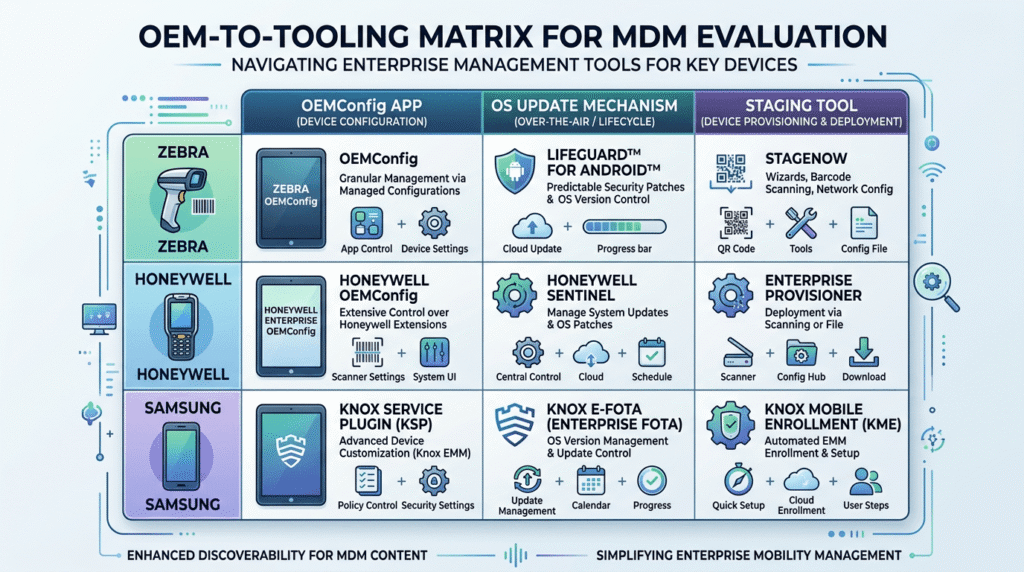
Every rugged OEM exposes device-specific capabilities through its own SDK or OEMConfig app. Zebra devices are managed through Zebra OEMConfig Powered by MX (or the older Legacy Zebra OEMConfig for pre-Android-13 fleets), which controls scanner behavior, programmable keys, network settings, and non-FOTA update behavior. Honeywell exposes UEMConnect (also called Honeywell OEM Config) for Mobility Edge devices and Honeywell OEMConfig for ScanPal EDA devices in the ScanPal series. Samsung’s rugged and semi-rugged Android hardware sits under the Knox Service Plugin. Datalogic, Panasonic, and other OEMs each publish their own OEMConfig equivalents.
An MDM that only claims “Android Enterprise support” without documented depth for your specific OEM will manage the device, but not manage the hardware. Scanner profiles, keypad remapping, battery-charge policies, and the OEM’s update mechanism will all be inaccessible. The mistake is buying the MDM before verifying the OEM depth. The fix is a proof of concept on real hardware before the contract signs.
3. Ignoring the legacy Android version reality
Rugged devices routinely ship and stay on Android versions that consumer hardware left years ago. It is common to find production rugged fleets running Android 10, Android 11, or even Android 8. Zebra publishes LifeGuard security updates for several years past the Android release, precisely because rugged customers cannot refresh hardware every two years. Honeywell’s Mobility Edge platform is built around long OS support lifecycles for the same reason.
The mistake is procuring an MDM that was tested only on current Android and discovering post-deployment that some policies do not apply cleanly to older versions. The right approach is to inventory the Android versions in your actual and planned fleet, and to confirm the MDM tests and supports those specific versions with the OEMConfig app you use. If half your warehouse is Android 11 and the MDM’s OEMConfig integration is documented only against Android 13 and later, that is a delivery risk before it is a support ticket.
4. Wrong enrollment mode for shared or dedicated devices
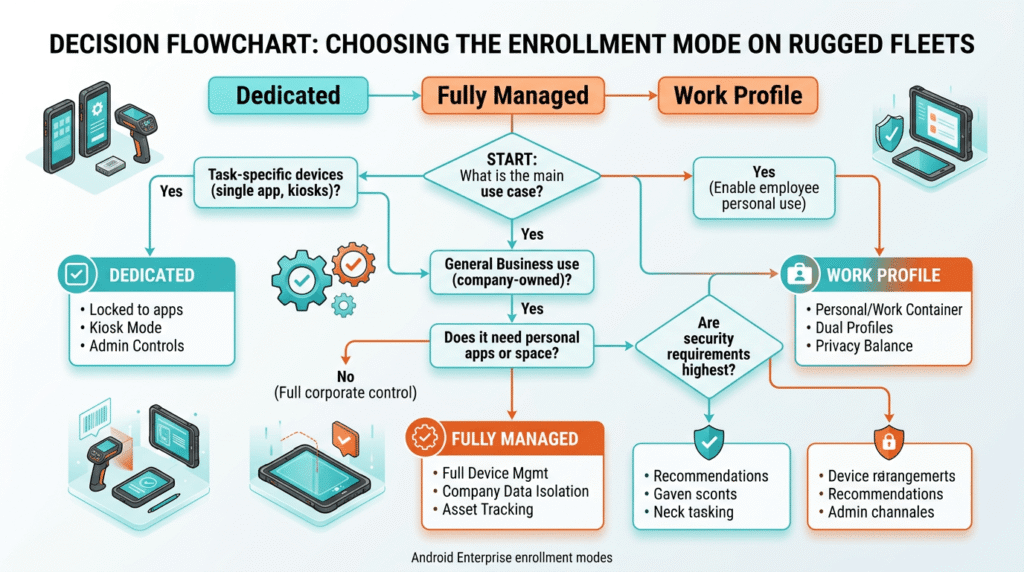
Rugged fleets are usually shared, dedicated, or both. A warehouse device may pass through three shift workers in twenty-four hours, each using it as a scanner locked to the warehouse-management app. A field-service device may belong to a single technician for the length of a route but reset for the next technician at shift end. The correct enrollment mode is almost always Android Enterprise Dedicated device (formerly COSU, Corporate Owned Single Use) or Fully Managed with tight kiosk policies.
The mistake is enrolling shared rugged devices as Work Profile because the MDM makes it the default flow. Work Profile offers a personal side that a shared device does not. Fully Managed, without the right kiosk restrictions, gives the user access to the full device when the workflow requires one app. Dedicated mode is the correct home for most rugged shared devices, and MDM configuration should treat the app allowlist, the launcher, and the reset-between-users behavior as first-class settings rather than afterthoughts.
5. No offline resilience plan
Rugged devices operate where connectivity is unreliable. Warehouses have Wi-Fi dead zones behind racking and near refrigeration. Field crews work in basements, tunnels, and rural sites. Utility workers reach substations and remote poles where cellular is weak or absent. Assuming steady connectivity is the reliable path to a failed deployment.
The mistake is designing every MDM interaction, every app data sync, and every user workflow around the assumption that the device is online. The fix is to inventory the offline scenarios the fleet actually encounters and to build the MDM policy, app design, and workflow around expected disconnections. The device must be able to complete the shift’s work offline, sync when connectivity returns, and receive delayed policy updates without breaking. MDMs that support offline command queueing and delayed enforcement are the correct fit for these fleets.
6. Skipping the OEM’s OS update mechanism
Every rugged OEM has its own OS update mechanism because standard Android update channels do not fit rugged support lifecycles. Zebra runs LifeGuard, its OS lifecycle and security-update program, and delivers those updates over the air via its FOTA (Firmware Over the Air) client, integrated with MDMs, including Intune, SureMDM, and others, through Zebra’s REST APIs. Honeywell publishes updates through its Enterprise Provisioner tool and its OEMConfig system-update settings.
The mistake is treating rugged OS updates as standard Android updates, either missing security patches entirely or leaving the OEM’s OS update system unconfigured. LifeGuard OTA cannot downgrade the OS without triggering an Enterprise Reset, and it requires both Zebra apps to be deployed via Managed Google Play and an active MDM enrollment. Honeywell Enterprise Provisioner requires its Windows utility, a Provisioner.XML task file, and the correct BSP to be staged locally. The fix is to configure and test the OEM update path during pilot, not after go-live.
7. No staging bench workflow
Rugged deployments benefit from bench provisioning where a staging technician preps a batch of devices before they go to users. The bench workflow enrolls the device, applies OEMConfig, installs the operational apps, configures peripherals, and validates the device against a checklist before it enters service. This is standard practice in warehouse and field operations at scale.
The mistake is skipping bench provisioning and relying on user-side enrollment. Users struggle with QR code enrollment on a scanner they do not yet know how to use. Peripheral pairing (Bluetooth scanners, printers, headsets) fails in the field but works fine on a bench. Zebra StageNow, Honeywell Enterprise Provisioner, and Samsung Knox Mobile Enrollment all support bench workflows, and the MDM’s Automated Enrollment complements them. Skipping the bench moves the failure to the user, where it costs more.
8. Poor peripheral and scanner profile management
Rugged devices are almost always paired with peripherals: barcode scanners on the device or on a Bluetooth ring, RFID readers, mobile printers, vehicle-mount cradles with pass-through charging, external headsets. Each peripheral has configuration state (Bluetooth pairing, printer language, scanner symbology, keyboard-wedge mode) that the MDM should manage, not the user.
The mistake is treating peripheral configuration as a user task, or treating scanner profiles as static settings baked into the app rather than as MDM-managed configuration. When peripheral configuration is user-managed, it drifts, and that drift shows up as scan-rate degradation, print jobs going to the wrong printer, and “device broken” tickets that are actually peripheral misconfigurations. OEMConfig apps expose scanner and peripheral settings for exactly this reason. Use them.
Vertical-specific pitfalls in field service
Field service deployments layer three additional failure modes on top of the cross-vertical mistakes.
Connectivity assumptions on the route. Field devices move through areas with variable cellular quality: residential neighborhoods, industrial sites, basements, remote roads. Dispatch, mapping, and work-order apps that assume continuous connectivity lead to technician downtime, missed appointments, and reconciled paperwork at the end of the day. The MDM’s role is to enable the app design that stores work offline and syncs opportunistically, and to set the policy so devices remain functional and secure while offline.
GPS and location integration. Field service depends on location: dispatch routing, drive time, on-site verification, mileage reporting. Location services must be reliably enforced through MDM policy, with a privacy scope that fits the work-time model. Rugged devices in vehicle mounts also need location behavior that survives long parking or overnight-storage scenarios without draining the battery.
Device loss, damage, and replacement. Field crews lose devices. They get left on truck bumpers, dropped on job sites, stolen from parked vehicles. The MDM policy for lost-device recovery (remote lock, Lost Mode, location tracking, wipe-on-timeout) has to be in place before it is needed, and the replacement workflow, how a new device is provisioned and shipped to the technician the same day, has to be documented and rehearsed. Fleets that discover this need after the first loss lose days of technician productivity.
Vertical-specific pitfalls in warehouse operations
Warehouse deployments concentrate around shift work, physical environment, and peripheral density.
Shift rotation and shared-device hygiene. Warehouse devices commonly rotate through three shifts a day. Each shift change should reset the device to a clean state: log out the previous user, clear any session data, relaunch the dedicated app, and confirm battery and connectivity. Devices that do not reset cleanly between users pass data leaks, personal customizations, and shift-boundary confusion to the next user. Multi-User support in the MDM, or a well-designed dedicated-mode reset routine, is the correct fix.
Forklift and vehicle-mount configuration. Warehouse devices mounted on forklifts, order-picking vehicles, and workstations behave differently from handheld devices. Vibration, sudden movement, boot-on-power scenarios, and pass-through charging all shape the device’s operational profile. Screen-off behavior, wake-on-motion, and immediate-boot-to-app configuration matter for productivity. These settings live in OEMConfig, and configuring them properly is not optional.
Scanner symbology and profile drift. A scanner that reads Code 128, Data Matrix, and QR at full speed on day one may report scan failures three months later. The reason is often symbology settings that drifted or a firmware update that reset the scanner profile defaults. MDM-enforced scanner profiles through OEMConfig prevent this drift, and warehouse ops should include a scanner-profile audit as part of monthly device health checks.
Vertical-specific pitfalls in utility operations
Utility work (meter reading, linemen, gas and water field crews, substation techs) has the most demanding connectivity and safety profile of the three verticals.
Dead zones and remote-site failover. Utility crews reach substations, rural corridors, and industrial sites where cellular is unreliable or absent. Meter readers work in basements. Linemen work on high poles far from towers. Dispatch, mapping, and work-order apps must be designed for genuine offline operation, and the MDM must not lock the device or force sync at intervals that break the work model. This connects directly to the offline resilience mistake in the cross-vertical section, and it is the vertical where the mistake incurs the highest cost.
Safety compliance and lone-worker protocols. Utility work involves safety protocols that touch the device: check-in intervals, emergency alerts, tag-out state, ATEX or intrinsically safe device certification for hazardous locations. The MDM enforces the safety-app allowlist and can enforce check-in behavior through policy; the device policy must work in conjunction with the utility’s safety management system rather than fight it.
Dispatch, AVL, and back-office integration. Utility fleets tie devices to Automatic Vehicle Location, work-order dispatch, and outage management systems. The MDM handles the device layer, but the deployment must integrate cleanly with the dispatch and OMS layers. Fleets that treat the MDM decision as separate from the dispatch integration discover the mismatch at go-live and pay to fix it after the fact.
Which MDM approach fits a rugged fleet?
Match the MDM to the OEM footprint and the operational reality.
| Fleet profile | Recommended approach |
|---|---|
| Zebra-heavy warehouse or logistics | MDM with Zebra OEMConfig Powered by MX support, LifeGuard OTA integration, and StageNow-compatible bench workflow |
| Honeywell-heavy field service | MDM with UEMConnect (Mobility Edge) or OEMConfig for ScanPal support, plus Enterprise Provisioner-based staging |
| Mixed rugged OEM fleet (Zebra plus Honeywell plus Samsung) | Cross-platform MDM with documented depth for each OEM’s OEMConfig app, verified during pilot |
| Utility crews with heavy offline exposure | MDM with proven offline resilience, command queueing, and delayed policy enforcement |
| Field service with cross-platform (Android rugged plus Windows Toughbook plus iOS phones) | Cross-platform MDM such as Bento MDM, Microsoft Intune, or Hexnode with per-platform capability honestly documented |
| Small fleet, single OEM, simple workflow | Dedicated rugged MDM like SOTI MobiControl or Scalefusion (rugged focus), or the OEM’s own management console (Zebra Workcloud, Samsung Knox Manage) |
Cross-platform MDMs, including Bento MDM, manage rugged Android devices using the same Android Enterprise and OEMConfig mechanisms that all compliant MDMs use. The differentiation between MDMs at the rugged layer is in depth of OEM support (which OEMConfig apps and versions are tested), OS update integration (LifeGuard OTA connector quality, Honeywell OEMConfig update coverage), and offline resilience for field and utility work. The correct evaluation is a hands-on pilot on the specific OEM and Android version mix you will actually deploy, not a paper feature comparison.
Frequently asked questions
Rugged device management is the discipline of enrolling, configuring, updating, and supporting rugged enterprise hardware from Zebra, Honeywell, Datalogic, Panasonic, and Sonim through an MDM platform that supports Android Enterprise and the OEM’s OEMConfig app or a dedicated SDK. It differs from consumer device management in that the devices are corporate-owned, often shared, usually run in dedicated (kiosk) mode, may run older Android versions, and depend on peripheral configuration through OEMConfig.
OEMConfig is a Google-defined standard that allows device manufacturers to expose hardware-specific settings to any Android Enterprise MDM via a Managed Google Play app. Zebra, Honeywell, Samsung, and other rugged OEMs publish OEMConfig apps that control scanner behavior, keypad mapping, network settings, and update policies. Without OEMConfig, an MDM can enroll a rugged device but cannot manage the hardware-specific features that make the device useful.
Any Android Enterprise-compliant MDM can enroll them and apply basic policies. Deep management requires the MDM to specifically support the OEM’s OEMConfig app, tested against the Android versions and device models in your fleet. Zebra devices need Zebra OEMConfig Powered by MX (or Legacy Zebra OEMConfig for pre-Android-13 devices). Honeywell devices need UEMConnect for Mobility Edge or OEMConfig for ScanPal EDA. The MDM’s Android Enterprise Recommended status is a useful baseline but not a substitute for verified OEM depth.
LifeGuard OTA is Zebra’s over-the-air OS and security update service. Devices must be enrolled in Android Enterprise as Device Owner and must have two apps installed via Managed Google Play: Zebra Enrollment Manager and Zebra Common Transport Layer. Once enrolled with the Zebra service, updates can be triggered from a compatible MDM through Zebra’s REST APIs. LifeGuard OTA cannot downgrade the OS without triggering an Enterprise Reset that wipes user data.
Almost always Android Enterprise Dedicated mode (formerly COSU) for shared or single-purpose devices, or Fully Managed with tight kiosk restrictions for single-user rugged devices. Work Profile is designed for BYOD personal devices and does not fit shared or dedicated corporate-owned rugged hardware. The MDM should configure the launcher, app allowlist, and between-user reset behavior as first-class settings on rugged deployments.
Not necessarily a different MDM, but a different level of MDM depth. A cross-platform MDM that manages phones, tablets, and rugged devices from a single console is often the right choice for mixed fleets, provided its OEMConfig support for the specific rugged OEMs is deep and up to date. For very large or single-OEM rugged fleets, a rugged-specialist MDM or the OEM’s own management console may offer deeper visibility. The decision is about the depth of OEM support and offline resilience, not the headcount of managed devices.
Design the fleet assuming disconnection, not against it. Apps should store work offline and sync when connectivity returns. The MDM should support offline command queuing and delayed policy enforcement rather than requiring continuous online presence. Pilot the offline scenarios your users will actually hit: warehouse dead zones, field-service basements, utility dead corridors, before deployment, not after.


Related Articles


