MDM Compliance Reporting: What Auditors Actually Need from Device Management

The typical MDM console shows dozens of dashboards. The typical auditor asks for a handful of specific artifacts. When those two do not match, the audit slows, the requests for information grow longer, and the exceptions are written into the report. Preparing MDM for a compliance audit is less about pushing more policies through the console and more about producing the specific evidence that maps to the framework the auditor is testing against.
This post covers what auditors actually ask for from a Mobile Device Management (MDM) platform during SOC 2, ISO 27001, HIPAA, and PCI-DSS audits, and how to structure MDM reporting so the evidence is ready when the request list arrives. It is written from the perspective of IT and compliance leaders who have been through an audit and know that “the MDM has a report for that” is not the same as “the auditor accepted the report.”
Three disambiguations keep the rest of the post readable. MDM here means Mobile Device Management, the discipline of managing device fleets. It is not Master Data Management, which is an unrelated data-governance category that shares the acronym. And it is not Medical Device (regulatory) compliance, which comes up in FDA and MDR contexts and also carries the MDM acronym in some usage. This post is specifically about mobile and endpoint device management and the compliance evidence that discipline produces.
What compliance reporting means in an MDM context
MDM compliance reporting is the discipline of producing verifiable evidence that the security controls promised by policy are actually enforced on managed devices. The evidence lives at the intersection of the MDM’s control plane (what policies are configured) and the device state (what those policies produced on the endpoint). Auditors care about both, and they care about the timestamped record that proves the state existed for the audit observation period, not just on the day the screenshot was captured.
The console-versus-auditor gap shows up on every audit. The MDM shows an enrolled devices dashboard, a policy assignment view, and a compliance status pie chart. The auditor asks for a device inventory with ownership, enrollment date, encryption status, and OS version as of a specific date, plus a comparable snapshot from ninety days earlier, plus evidence that any non-compliant devices were remediated or retired. The gap is not that the MDM lacks the data. MDM reporting is designed for operational decisions, and audit reporting is designed to evidence control over time.
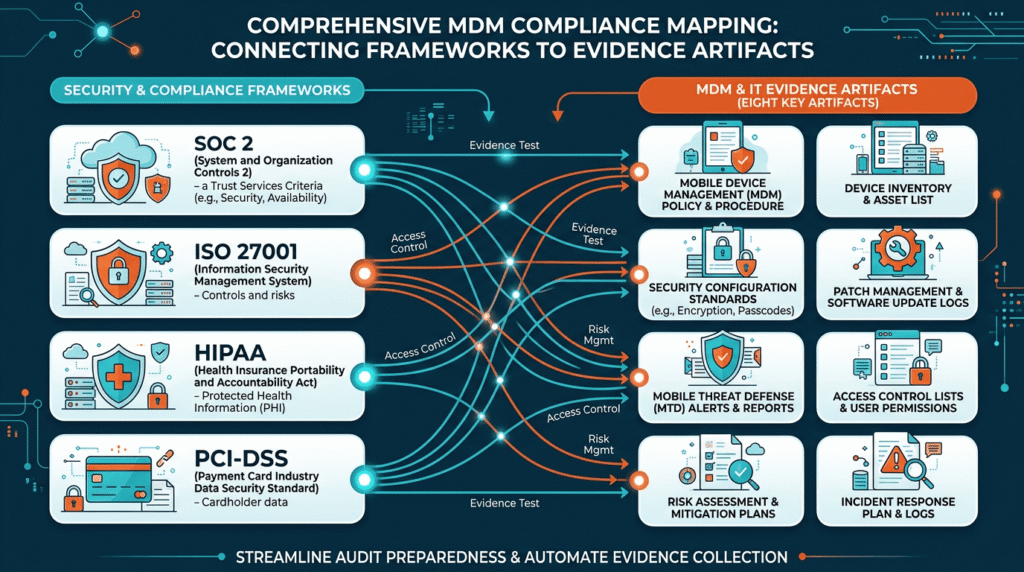
The frameworks that map to MDM evidence
Four frameworks account for most MDM-related audit work in mid-market and enterprise organizations. Each maps to a slightly different set of MDM evidence, though the core artifacts overlap substantially.
SOC 2 (CC6 and CC7)
SOC 2 is organized around the AICPA Trust Services Criteria. The MDM evidence lands mostly in CC6 (Logical and Physical Access Controls) and CC7 (System Operations), the two most heavily tested criteria in SOC 2 audits. CC6 covers access enforcement, authentication, and device control. CC7 covers system monitoring, detection, and response. The AICPA’s 2022 revised points of focus specifically added device recovery procedures for lost or stolen devices, which directly implicates MDM’s remote lock, wipe, and recovery capabilities.
Auditors testing CC6 and CC7 through an MDM ask for disk encryption verified as active (not just enabled by policy), screen lock enforcement, automatic-update coverage, and compliant-versus-non-compliant device counts across the observation period. SOC 2 Type 2 requires evidence across a defined window, typically three to twelve months, so single-point-in-time evidence is not sufficient.
ISO 27001:2022
ISO 27001:2022 (which superseded the 2013 version) organizes controls under Annex A. Several of these controls directly affect MDM: A.5.14 information transfer, A.6.7 remote working, A.7.9 security of assets off-premises, A.8.1 user endpoint devices, A.8.2 privileged access rights, A.8.9 configuration management, and A.8.16 monitoring activities. Auditors mapping ISO 27001 to MDM look for policy documents, configuration baselines applied to endpoints, and evidence that deviations were detected and handled.
HIPAA Security Rule
For healthcare-adjacent organizations, HIPAA’s Security Rule technical safeguards drive most MDM evidence. Section 164.312(a)(1) covers access control (unique user identification, emergency access, automatic logoff, encryption and decryption). Section 164.312(b) covers audit controls (record and examine activity). Section 164.312(c)(1) covers integrity of ePHI. Section 164.312(e)(1) covers transmission security. On a mobile device fleet handling ePHI, the healthcare MDM serves as the enforcement layer for most of this, and reporting confirms it.
PCI-DSS v4.0
PCI-DSS v4.0 (the current version, which replaced 3.2.1 in 2024) applies to organizations handling cardholder data on managed devices. Requirements 2 (secure configurations), 6 (patching), 8 (identity and authentication), and 11 (regular testing) all touch MDM. PCI’s requirements are more prescriptive than SOC 2’s, so the audit questions tend to be more specific: “show us the configuration standard, the exception process, and the evidence that every device in scope matches the standard.”
Framework-to-MDM-control mapping
| Framework | Section / control | MDM evidence needed |
|---|---|---|
| SOC 2 | CC6.1 access controls | Enrollment records, authentication policy enforcement, RBAC in MDM console |
| SOC 2 | CC6.7 encryption | Active disk encryption report (FileVault, BitLocker, Android and iOS device encryption) |
| SOC 2 | CC7.1 monitoring | Non-compliant device counts over time, alert configurations, ticket records |
| SOC 2 | 2022 device recovery point of focus | Lost or stolen device response records: remote lock, wipe, retrieval evidence |
| ISO 27001:2022 | A.8.1 user endpoint devices | Endpoint inventory, configuration baseline, enforcement evidence |
| ISO 27001:2022 | A.8.9 configuration management | Policy definitions, applied policy evidence, drift detection |
| ISO 27001:2022 | A.8.16 monitoring | Device state monitoring, deviation alerts, response records |
| HIPAA | 164.312(a)(1) access control | Authentication policy, automatic logoff, encryption enforcement |
| HIPAA | 164.312(b) audit controls | Device activity logs, access records |
| HIPAA | 164.312(e)(1) transmission security | VPN or TLS enforcement, transmission encryption evidence |
| PCI-DSS v4.0 | Requirement 2 | Secure configuration baseline for every in-scope device |
| PCI-DSS v4.0 | Requirement 6 | Patch status against defined SLA |
| PCI-DSS v4.0 | Requirement 8 | Identity and authentication policy enforcement |
Eight evidence artifacts auditors actually ask for
These eight artifacts appear in nearly every audit that touches MDM, regardless of the framework. The specific format varies, but the underlying data is consistent.
1. Accurate device inventory
The starting point of every audit is the inventory. Auditors ask for a list of all managed devices in scope, including owner, ownership model (corporate, BYOD, contractor), enrollment date, OS and version, and current management state. Then they ask for a comparable inventory from an earlier date in the observation period to test that inventory is maintained, not just produced for the audit.
Common failure: devices that have not checked in for weeks still appearing in the “compliant” bucket. The inventory has to reflect the actual current state, and the reporting has to flag stale devices. If devices leave the fleet through loss, theft, or retirement, that has to be tracked as an event, not as a silent disappearance.
2. Encryption enforcement report (active, not merely enabled)
Auditors distinguish between “encryption enabled in policy” and “encryption verified as active on the device.” An MDM report indicating that a FileVault policy is assigned to all Macs does not prove that FileVault is actively encrypting every Mac. The auditor wants the second report: enrolled devices, encryption verified as on, and the escrowed recovery key held by the organization for every encrypted device.
The same applies to BitLocker on Windows, Android Work Profile encryption, and iOS device encryption. In each case, the auditor’s question is “which devices are actually encrypted right now, and how do you know?” The MDM should produce that as a single report, not a set of screenshots.
3. Passcode and authentication policy evidence
Two artifacts here: the policy definition (what the passcode requirements are) and the enforcement evidence (which devices comply with the policy). The policy definition is usually straightforward. The enforcement evidence is where MDMs vary in maturity. Some produce clear per-device compliance status; some only show policy assignment, which is not the same thing.
For auditors testing MFA (which SOC 2 CC6 explicitly requires), the MDM’s role is often to enforce device-level authentication that feeds into the broader MFA posture, and the reporting has to align with the identity provider’s MFA reports.
4. Patch compliance status against defined SLA
Audit expectations for patch cadence are increasingly specific. Common SLA norms auditors expect to see: critical patches applied within 30 days, high-severity within 60 days, medium within 90 days. The MDM report should show, for each device and patch severity, whether the device meets the SLA. Aggregate percentages are useful for management reporting but not sufficient for audit evidence. The auditor wants to see the outliers.
5. Compliant vs non-compliant device count over time
For SOC 2 Type 2 in particular, this is the single most valuable report. Auditors want to see the counts of compliant, non-compliant, and unresponsive devices over the observation period, typically on a monthly or weekly basis. Spikes in non-compliance have to be explained: which devices, why non-compliant, what remediation, when returned to compliance.
Auditors have gotten sharper about detecting reports assembled retroactively. The 2026 shift toward continuous evidence collection means that a trend chart produced fresh the week before the audit will draw more questions than a chart that was clearly maintained throughout the period.
6. Lost or stolen device response records
The AICPA’s 2022 SOC 2 revision explicitly added device recovery procedures as a focus area. This means auditors now specifically ask for records of lost-or-stolen device incidents: the initial report, the MDM action taken (remote lock, wipe, Lost Mode), the timeline, and the confirmed status. Even organizations with no lost-device incidents in the observation period should be able to show the process, ideally through a test event or a documented tabletop exercise.
7. Off-boarding and device retirement evidence
When employees leave, devices need to be either wiped and returned to inventory or retired. Auditors ask for the off-boarding process documentation and sample evidence of specific off-boarding events during the observation period: which employee, which device, what MDM action was taken, when, and by whom confirmed.
The common gap is retired devices that were never actually decommissioned in the MDM. They stop reporting, they disappear from the console, but the record of the deliberate retirement is missing. That gap becomes an audit exception because it prevents the auditor from confirming that data was removed.
8. Policy change management: who approved, when applied
Auditors test whether policy changes go through the change management process. For MDM, this means an audit trail of who created or modified a policy, when it was approved, when it was pushed to devices, and evidence that the change was reviewed. Sophisticated MDMs expose policy change history in the console. Less mature deployments manage this outside the MDM, in a change ticket system that references the MDM policy version.
Either approach works, provided the linkage is clean. The failure mode is a policy that was clearly changed during the observation period with no corresponding change record, which the auditor will flag as a control gap.
The 2026 shift: continuous monitoring, not point-in-time screenshots
SOC 2 auditor expectations have shifted meaningfully in 2026. Auditors increasingly want evidence that controls were operating throughout the observation period, every day, not just on the day the evidence was collected. Point-in-time screenshots produced at report time still fill in gaps, but they are less trusted as primary evidence.
For MDM reporting, this means machine-generated exports carry more weight than screenshots. An export from the MDM API showing device state on a specific date, with timestamp, ownership, and source system context, is stronger evidence than a screenshot of the same view. The 2026 auditor expectation is that MDM data is captured continuously, whether by the MDM’s own reporting cadence or by a compliance-automation tool ingesting MDM API data, and that the evidence trail is complete for the observation period.
Practical implication: build the reporting cadence to match the audit observation period, not to match the audit deadline. If the SOC 2 Type 2 observation window is six months, the MDM reports should have been running weekly for those six months, not compiled the week before the auditor arrives.
Common audit findings that MDM causes
Certain findings recur across audits where MDM is in scope. Knowing them in advance prevents most of them.
Devices not enrolled at all. Contractor laptops, replacement devices issued in the last month, executive personal devices used for work. Any device with organizational data that is not enrolled is a scoping gap. The correct response is a defined scope with a clear enrollment SLA for new devices.
Stale devices still counted as compliant. A device that has not checked in for 45 days is noncompliant, but MDMs sometimes treat the last known state as the current state. The reporting has to distinguish current-state compliance from last-reported compliance.
Encryption “enabled” but not verified as active. The FileVault or BitLocker policy is assigned, but the auditor cannot see per-device confirmation that encryption is on. This is the single most common encryption finding.
BYOD scoping unclear. Auditors want to know which BYOD devices are in scope and how the organization separates work and personal data. Fleets running a mix of Android Work Profile, iOS User Enrollment, and unmanaged personal use of corporate SaaS must be able to demonstrate the boundary.
Policy changes not tracked. A policy version that clearly changed but has no change record.
Missing off-boarding evidence. Off-boarded users, devices retired but no record of the retirement action.
No lost-device response documentation. Nothing on file demonstrating the organization’s response procedure, even if no incidents occurred.
How to structure MDM reporting for audit readiness
The design principle is evidence-first, not dashboard-first. Dashboards are for operations. Reports are for audit. The two are related but not identical, and structuring MDM reporting around the report the auditor will ask for saves time on both ends.
Prefer machine-generated exports over screenshots. When an auditor accepts screenshots, timestamps and source metadata matter. An MDM report exported from the console as a CSV or PDF, with the timestamp, the applied filter, and the source system, is stronger evidence than a cropped screen capture. Where the MDM offers an API, integrating with a compliance automation tool (or exporting to a controlled repository on a schedule) produces the continuous evidence trail that the 2026 audit expects.
Match reporting cadence to the observation period. If SOC 2 Type 2 covers six months, the compliance reports should have been generated weekly or monthly over that period, and the evidence stored somewhere retrievable. Waiting until the audit request to produce evidence is a red flag to sophisticated auditors.
Match retention to framework requirements. HIPAA requires 6 years of audit log retention. SOC 2 covers the observation period plus reasonable retention beyond. PCI-DSS requires one year of audit trail history with three months immediately available. Reporting design should account for the longest retention requirement applicable to the fleet.
Which MDM approach fits a compliance-heavy fleet?
Match the MDM to the compliance profile.
| Fleet profile | Recommended approach |
|---|---|
| Single-framework, single-platform | MDM with strong reporting for that platform and framework: Jamf for Apple + SOC 2, Intune for Windows + SOC 2, healthcare specialist for HIPAA-heavy Apple fleets |
| Multi-framework mid-market | Cross-platform MDM with clean per-framework reporting: Bento MDM, Microsoft Intune, Hexnode |
| Regulated healthcare (HIPAA) | MDM with BAA available, mature HIPAA-mapped reporting, audit-log retention meeting §164.312(b) |
| PCI-heavy retail or hospitality | MDM with strong configuration baseline reporting, patch SLA visibility, in-scope device scoping |
| Federal or defense (FedRAMP, CMMC, NIST 800-171) | MDM with published FedRAMP authorization or on-premise deployment for CUI environments |
| Fintech or financial services | MDM with strong SOC 2 and ISO 27001 alignment, mature policy change management, RBAC in the MDM console |
Cross-platform MDMs, including Bento MDM, produce audit evidence using the same reporting mechanisms as all compliant MDMs. The differentiation at the compliance layer lies in the depth of framework mapping, the granularity of per-device reporting, API access for continuous evidence collection, and how cleanly the console exposes policy change history. The correct evaluation is to ask the vendor to walk through a sample audit request list against real reports, not to ask whether the vendor “supports SOC 2.”
Frequently asked questions
What is MDM compliance?
MDM compliance has two related meanings. In everyday IT usage, it refers to the state of a managed device relative to organizational security policy, including whether the device is enrolled, encrypted, patched, and compliant with passcode and configuration rules. In audit usage, it refers to the discipline of producing evidence that the MDM’s security controls are actually enforced across the fleet, in a form that maps to frameworks such as SOC 2, ISO 27001, HIPAA, or PCI-DSS.
What does an auditor actually want to see from MDM?
Concrete artifacts, not dashboards. The typical request list includes device inventory as of a specific date with ownership and encryption status, evidence that encryption is active (not just enabled by policy), passcode and authentication policy enforcement, patch compliance against a defined SLA, compliant-versus-non-compliant device counts over the observation period, lost-device response records, off-boarding evidence, and policy change history.
Is MDM enough by itself for SOC 2 compliance?
No. MDM is one of several tools that produce SOC 2 evidence. It covers CC6 (Logical and Physical Access Controls) and CC7 (System Operations) evidence for managed devices, but SOC 2 also requires evidence from identity providers, EDR, log management, change management, vendor risk, and other controls. MDM is a necessary but not sufficient piece of the SOC 2 evidence stack.
What is the difference between MDM compliance and MDM compliance reporting?
MDM compliance is the state of the fleet. MDM compliance reporting is the evidence artifacts that prove that state to an auditor. A fleet can be compliant without producing good reporting, and produce good reporting for a fleet that is not actually compliant. Audit readiness requires both enforcing the controls and producing evidence that they were enforced.
How does MDM support HIPAA compliance?
For fleets that handle ePHI on managed devices, MDM enforces the HIPAA Security Rule’s technical safeguards: access control (§164.312(a)(1)) through authentication policy, encryption, and automatic logoff; audit controls (§164.312(b)) through device activity logs; integrity (§164.312(c)(1)) through configuration baselines; and transmission security (§164.312(e)(1)) through VPN or TLS enforcement. The reporting produced by the MDM is the evidence a HIPAA audit or breach investigation examines.
How does the 2026 SOC 2 shift affect MDM reporting?
Auditors now expect stronger evidence that controls operated throughout the SOC 2 observation period, not just on the day evidence was collected. For MDM, this means point-in-time screenshots are weaker evidence than continuous exports from the MDM (through the API or scheduled report generation) that show device state across the audit window. Compliance automation tools that continuously ingest MDM data fit this pattern well.
Does MDM reporting differ between BYOD and corporate-owned devices?
Yes, and auditors specifically ask about the boundary. For corporate-owned devices, the MDM report can cover the full device state. For BYOD devices with an Android Work Profile or iOS User Enrollment, the MDM report covers only the corporate container, and the audit evidence must reflect that scope. Auditors want the organization to be explicit about which devices are in scope, which reports cover which scope, and how BYOD data separation is enforced and evidenced.

Related Articles


