Best tablets for business fleets in 2026: what IT teams should buy

The best tablet for business is rarely the one with the highest benchmark score. For a team buying a single device, the spec sheet is the deciding factor. For an organization deploying ten, a hundred, or a thousand tablets, the decision is different: which device enrolls cleanly into management, receives security updates throughout the deployment, survives the environment it operates in, and runs the apps the team depends on. This guide is written for the second buyer.
Most best-tablet roundups rank devices for individual buyers. They optimize for camera quality, stylus latency, and media playback. Those factors matter far less to an IT team standing up a fleet, where enrollment support, update commitment, ruggedization, and manageability decide the real cost of ownership over three to five years. This post ranks nine tablets by fleet fitness across Apple, Android, and Windows, then covers how IT actually manages them once they are deployed.
One disambiguation before the list. A business tablet is a consumer or enterprise tablet deployed for work, managed through a Mobile Device Management (MDM) platform. This guide covers standard and enterprise-grade tablets across the three major platforms. It is not a rugged-only guide, though it includes the leading rugged picks, nor is it a review of tablet apps.
How to choose a business tablet: the criteria that matter for fleets
The best tablet for business is chosen against fleet criteria, not consumer ones. Six factors decide fleet fitness, and they are weighted differently than they would be for a personal purchase.
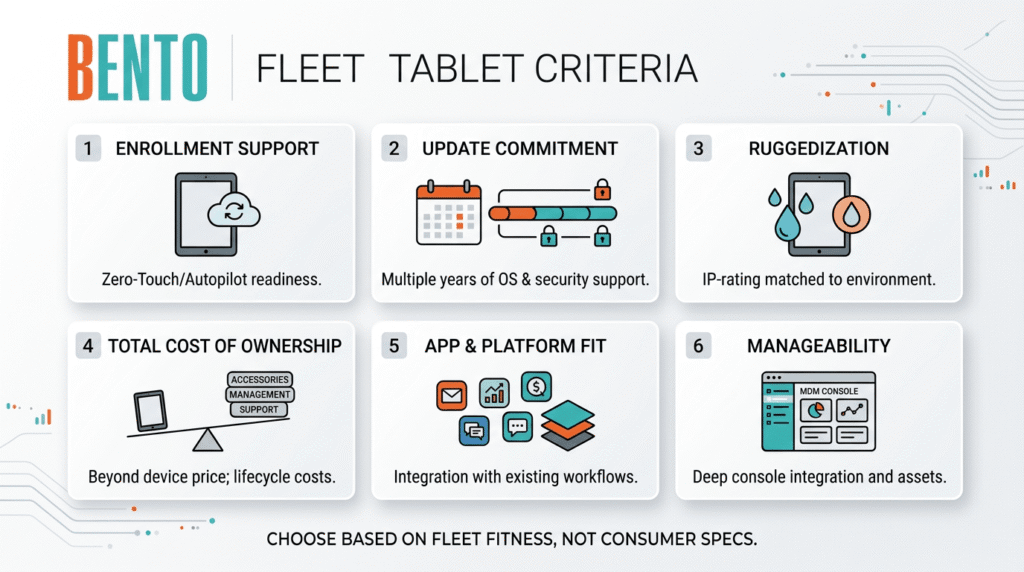
Enrollment support. Can the tablet enroll into management automatically at first boot? Apple devices use Automated Device Enrollment through Apple Business Manager. Android devices use Android Zero-Touch or Samsung Knox Mobile Enrollment. Windows devices use Windows Autopilot. A tablet that supports one of these is a tablet IT can ship straight to the user without touching it.
Update commitment. How many years of OS and security updates does the manufacturer guarantee? A three-year deployment on a device with two years of updates leaves a year of unpatched exposure. This single factor more clearly separates enterprise-grade tablets from consumer ones than any hardware spec.
Ruggedization. Does the environment demand IP-rated, drop-tested hardware? A warehouse, a delivery route, or a clinical setting has different survival requirements than a boardroom. Over-buying ruggedization wastes budget; under-buying it results in breakage and replacement costs.
Total cost of ownership. The device price is the smallest part. Accessories, the management platform, replacement rate, and support time over the deployment life dominate the real number. A cheaper tablet that breaks twice as often costs more.
App and platform fit. Does the tablet run the apps the team relies on, and does its platform match the existing environment? A Microsoft-centric organization gets more from Windows tablets; an Apple-centric one from iPads. Fighting the existing stack is expensive.
Manageability. How cleanly does the device sit inside an MDM console alongside the rest of the fleet? Purpose-built enterprise tablets expose deeper management hooks through OEMConfig and vendor programs like Samsung Knox. This is where a device stops being a gadget and becomes a manageable asset.
The best tablets for business in 2026
The nine tablets below are grouped by the job they do best: general business use, rugged and field work, and Windows-specific scenarios. Each entry covers what it is good for, the enrollment path, and the update commitment, because those are the factors a fleet decision turns on.
1. Apple iPad Air (M4): the general-purpose default
The iPad Air is the tablet most businesses should default to for general work: front-of-house, admin, scheduling, cloud apps, and document review. It carries most of the iPad Pro’s capability at a lower per-device cost, which matters across a fleet.
For management, the iPad Air enrolls through Apple Automated Device Enrollment via Apple Business Manager, which supervises the device automatically at first boot. Apple provides a long software-update horizon across its iPad line, typically the strongest in the tablet market. For a mixed-use business fleet where the work is cloud apps and light productivity, this is the safe pick.
Best for: general business use, retail front-of-house, and cloud app workflows.
Enrollment: Apple Automated Device Enrollment via Apple Business Manager.
2. Apple iPad Pro (M5): the high-performance iPad
The iPad Pro is for the roles that genuinely need the extra performance: design review, video, engineering apps, and demanding creative work. For most business fleets, it is more tablet than the job requires, and the iPad Air offers better value. Where the workload is heavy, the Pro earns its price.
It shares the same management story as the rest of the iPad line: Automated Device Enrollment, supervision through Apple Business Manager, and Apple’s long update commitment. The decision between Air and Pro is a workload-and-budget question, not a management one.
Best for: performance-critical creative and technical roles.
Enrollment: Apple Automated Device Enrollment via Apple Business Manager.
3. Samsung Galaxy Tab S11: the premium Android pick
The Galaxy Tab S11 is the current flagship business Android tablet and the successor to the Tab S9 line. One naming detail matters for buyers: Samsung’s flagship line moved from S9 to S11, so there is no base Tab S10 in this tier. Purchasing against the outdated model name is an avoidable mistake.
For fleets, the Tab S11’s advantage is Samsung Knox and Android Enterprise support, which give deep management control and reliable enrollment. Samsung’s Enterprise Edition variants extend the update and support commitment even further, making the upgrade worthwhile for multi-year deployments. The Tab S11 Ultra, with its larger display, suits executive workstations and high-visibility kiosk installations.
Best for: premium Android productivity, executive and customer-facing use.
Enrollment: Samsung Knox Mobile Enrollment or Android Zero-Touch.
4. Samsung Galaxy Tab A11+: the value fleet tablet
For organizations deploying tablets in volume with straightforward workloads, the Galaxy Tab A11+ offers the best combination of price, functionality, and manageability. It is the sensible choice for check-in stations, shared-device pools, and general-purpose fleet roles that do not need flagship performance.
Crucially for a fleet, the A-series still supports Samsung Knox and Android Enterprise enrollment, so a lower price does not mean giving up manageability. Confirm the specific update commitment for the exact model at purchase, since it is shorter than the flagship and Enterprise Edition lines.
Best for: high-volume, general-purpose deployments on a budget.
Enrollment: Samsung Knox Mobile Enrollment or Android Zero-Touch.
5. Samsung Galaxy Tab Active5: the mainstream rugged pick
When the tablet has to survive drops, spills, dust, and all-day handling, the Galaxy Tab Active5 is the mainstream rugged choice. It is IP68-rated, drop-tested, and carries a user-replaceable battery, which matters for shift work where a dead battery cannot take a device out of service.
Samsung sells an Enterprise Edition variant with a notably longer update commitment and a year of Knox Suite included, which is the version most fleets should buy. It enrolls through Samsung Knox Mobile Enrollment like the rest of the Galaxy line, so a rugged tier can sit in the same console as the standard tablets. This is the pick for logistics, field service, warehousing, and clinical settings that do not need a full industrial handheld.
Best for: field service, logistics, warehousing, clinical environments.
Enrollment: Samsung Knox Mobile Enrollment.
6. Zebra ET40 and ET45: the enterprise rugged tier
For dedicated industrial and warehouse deployments, purpose-built rugged tablets from Zebra sit a tier above the Galaxy Tab Active line. The ET40 and ET45 are designed for enterprise data capture, with integrated barcode scanning options, and are built to be managed at scale rather than used as personal devices.
The management consideration here is OEMConfig. Zebra exposes device-specific controls (scanner behavior, key mapping, update policy) through its OEMConfig app and its Zebra Enrollment Manager, so an MDM that supports Zebra OEMConfig can configure the hardware, not just enroll it. For warehouse and logistics fleets built around scanning, this tier is the right answer, and verifying OEMConfig depth on the specific model is essential before purchase.
Best for: warehouse, logistics, and scanning-intensive industrial fleets.
Enrollment: Zebra Enrollment Manager with Android Zero-Touch; managed through Zebra OEMConfig.
7. Microsoft Surface Pro (12th Gen): the Windows detachable
The Surface Pro is the pick when the team needs full Windows rather than a mobile OS. It runs the complete Windows desktop, Office, and Windows-only line-of-business software, and it drops into a Windows-managed environment in a way no iPad or Android tablet can match. For organizations already standardized on Microsoft, this is the natural fit.
For fleets, the Surface Pro enrolls through Windows Autopilot, provisioning itself from the cloud at first boot into the organization’s management tenant. It is best understood as a laptop replacement in tablet form rather than a mobile-first device. Where the work is Windows document workflows and keyboard-heavy admin, it is the strongest option in this guide.
Best for: Windows-dependent workflows, laptop-replacement scenarios, Microsoft-centric organizations.
Enrollment: Windows Autopilot.
8. Apple iPad (A16): the low-cost front-counter tablet
The entry iPad is the low-cost option for front-counter intake, check-ins, and simple single-purpose roles where flagship performance is unnecessary. It carries the same management story as the rest of the iPad line, which is what separates it from a cheap consumer tablet: Automated Device Enrollment, supervision, and Apple’s update commitment.
For a business setting up kiosks or check-in tablets on a budget, the entry iPad, locked into Single App Mode, is a clean, manageable, low-cost deployment. It is the value pick within the Apple ecosystem.
Best for: front-counter, check-in, single-app and kiosk roles on a budget.
Enrollment: Apple Automated Device Enrollment via Apple Business Manager.
9. Samsung Galaxy Tab S10 FE+: the large-screen value pick
The Galaxy Tab S10 FE+ pairs a large display with a lower price than the flagship line, making it effective for customer-facing applications where screen visibility matters: interactive displays, review stations, and presentations. It gives a fleet a big-screen Android option without flagship cost.
It carries the same Samsung Knox and Android Enterprise manageability as the rest of the Galaxy line, so it slots cleanly into an existing Samsung fleet. For roles that need screen real estate more than raw performance, it is a sensible middle option.
Best for: large-screen customer-facing and review workflows on a mid-range budget.
Enrollment: Samsung Knox Mobile Enrollment or Android Zero-Touch.
Business tablet comparison at a glance
The table below compares the nine picks by the factors that drive a fleet decision: platform, best-fit role, enrollment path, and ruggedization.
| Tablet | Platform | Best for | Enrollment path | Rugged |
|---|---|---|---|---|
| iPad Air (M4) | iPadOS | General business default | Apple ADE via Apple Business Manager | No |
| iPad Pro (M5) | iPadOS | Performance-critical roles | Apple ADE via Apple Business Manager | No |
| Galaxy Tab S11 | Android | Premium Android productivity | Samsung Knox or Android Zero-Touch | No |
| Galaxy Tab A11+ | Android | Value fleet deployments | Samsung Knox or Android Zero-Touch | No |
| Galaxy Tab Active5 | Android | Mainstream rugged field work | Samsung Knox Mobile Enrollment | Yes |
| Zebra ET40 / ET45 | Android | Industrial and scanning fleets | Zebra Enrollment Manager, OEMConfig | Yes |
| Surface Pro (12th Gen) | Windows | Full-Windows workflows | Windows Autopilot | No |
| iPad (A16) | iPadOS | Low-cost front-counter and kiosk | Apple ADE via Apple Business Manager | No |
| Galaxy Tab S10 FE+ | Android | Large-screen customer-facing | Samsung Knox or Android Zero-Touch | No |
Choosing a platform: iPadOS, Android, or Windows
Before picking a specific tablet, most organizations should decide the platform, because it constrains everything downstream: enrollment path, app availability, management tooling, and how the tablet fits the existing environment.
iPadOS suits organizations that value a long-term commitment to updates, a consistent management model through Apple Business Manager, and a mature business app ecosystem. It is the low-friction default for general business use, and the strongest choice where update longevity is the priority.
Android suits organizations that need hardware variety, from budget fleet tablets to purpose-built rugged devices, and that value Samsung Knox and Android Enterprise for deep management control. It is the platform with the widest range of form factors and price points, and the only one with a genuine rugged tier.
Windows suits organizations that need full desktop software, Windows-only line-of-business apps, and integration with an existing Microsoft-managed environment. A Surface Pro is a laptop replacement in tablet form, not a mobile-first device, and that is exactly its strength for the right team.
Managing a business tablet fleet: what happens after purchase
Choosing the tablet is the first decision. Managing the fleet is the recurring one, and it is where the real cost of ownership lives. Whichever platform a business picks, the tablets are enrolled, configured, secured, and monitored through a Mobile Device Management platform.
A cross-platform MDM matters here because most real fleets are not single-platform. A retail business might run iPads at the counter, Galaxy Tab Active5 units in the stockroom, and a Surface Pro in the back office. Managing each platform in a separate tool is a recurring operational tax. Cross-platform MDMs, including Bento MDM, manage Android, iOS, iPadOS, macOS, and Windows tablets from a single console, which helps keep a mixed fleet administrable as it grows.
The management work itself is consistent across platforms: automatic enrollment at first boot, configuration and app deployment, security policy enforcement, compliance monitoring, and remote support. For tablets deployed in fixed-purpose roles, kiosk lockdown restricts the device to a single app or an approved set of apps. For rugged Android fleets, OEMConfig support determines whether the MDM can configure the hardware or only enroll it.ggg
Which business tablet fits your fleet?
Match the tablet to the fleet profile and the work it does, then to the platform and management model that fit the existing environment.
| Fleet profile | Recommended tablet |
|---|---|
| General business, cloud apps, Apple-friendly | iPad Air (M4), managed through Apple Business Manager |
| General business, budget, high volume | Galaxy Tab A11+, managed through Samsung Knox |
| Premium Android productivity | Galaxy Tab S11 or S11 Ultra, Enterprise Edition for longer support |
| Field service, logistics, clinical | Galaxy Tab Active5 Enterprise Edition |
| Warehouse and scanning-intensive | Zebra ET40 or ET45, managed through OEMConfig |
| Windows-dependent, Microsoft-centric | Surface Pro (12th Gen), provisioned through Windows Autopilot |
| Low-cost front-counter or kiosk | iPad (A16) in Single App Mode, or Galaxy Tab A11+ |
| Mixed platform fleet | Any of the above, managed from one cross-platform MDM console |
Cross-platform MDMs, including Bento MDM, manage business tablets across Android, iPadOS, and Windows from a single console, handling automatic enrollment, security policies, kiosk lockdown, and compliance monitoring. The tablet choice sets the hardware; the MDM sets how manageable that hardware is across its deployment life. The right evaluation pairs the tablet shortlist above with a management pilot on the actual devices, not a spec-sheet comparison alone.
Frequently asked questions
For most businesses, the best tablet for general work is the Apple iPad Air (M4), which balances performance, a long update commitment, and clean enrollment through Apple Business Manager. The best choice depends on the fleet: the Samsung Galaxy Tab S11 leads premium Android, the Galaxy Tab Active5 leads mainstream rugged, and the Microsoft Surface Pro leads Windows-dependent workflows. Match the tablet to the work and the existing platform rather than to the highest spec sheet.
The Samsung Galaxy Tab S11 is the best premium Android business tablet, with strong performance plus Samsung Knox and Android Enterprise for fleet management. For high-volume, high-value deployments, the Galaxy Tab A11+ offers manageability at a lower price. For rugged field work, the Galaxy Tab Active5 Enterprise Edition is the mainstream pick. Note that Samsung’s flagship line went from S9 to S11, so there is no base Tab S10 in that tier.
For mainstream rugged use across field service, logistics, and clinical settings, the Samsung Galaxy Tab Active5 is the standard pick: IP68-rated, drop-tested, with a replaceable battery. For dedicated industrial and warehouse deployments that need integrated scanning, purpose-built Zebra tablets such as the ET40 and ET45 sit a tier above, and are managed through Zebra OEMConfig for hardware-level control.
It depends on the software. An iPad is better for mobile-app and cloud-based workflows, and offers a longer update commitment and simpler management through Apple Business Manager. A Surface Pro is better when the team needs full Windows desktop software or Windows-only line-of-business apps, and it integrates directly into a Microsoft-managed environment. The Surface Pro is a laptop replacement; the iPad is a mobile-first device.
Businesses manage tablet fleets through a Mobile Device Management (MDM) platform. The MDM enrolls devices automatically at first boot (through Apple Automated Device Enrollment, Samsung Knox Mobile Enrollment, Android Zero-Touch, or Windows Autopilot), deploys apps and configuration, enforces security policy, monitors compliance, and provides remote support. A cross-platform MDM manages tablets across iPadOS, Android, and Windows from a single console, keeping a mixed fleet manageable.
Match the update commitment to the deployment length, with margin. A three-year deployment requires at least three years of guaranteed OS and security updates; more is better. Apple’s iPad line typically offers the longest horizon. Samsung’s Enterprise Edition variants extend support well beyond the standard consumer commitment, making them the right choice for multi-year fleet deployments. A device that stops receiving security updates mid-deployment is an unpatched liability.
For a small business running cloud apps, scheduling, payments, and customer work, the Apple iPad Air (M4) is the strongest all-round pick, with the entry iPad (A16) as the budget option for front-counter roles. Small businesses on Android should look at the Galaxy Tab A11+ for value or the Galaxy Tab S11 for premium use. Even at small scale, choosing a tablet with proper enrollment and update support avoids management headaches later.

Related Articles


