Mobile device procurement checklist: what IT should verify before buying hardware

Mobile device procurement is the process of selecting and buying the phones, tablets, and other mobile hardware an organization deploys to its people. Most procurement advice focuses on price, vendor, and warranty, which matter, but it skips the checks that decide whether the devices can actually be enrolled, secured, and managed once they arrive. A device that clears every cost and vendor box but cannot enroll cleanly into your management platform is a procurement mistake that only surfaces after the boxes are opened.
This checklist covers what IT should verify before signing the purchase order, with an emphasis on management readiness, the factors that determine whether a fleet deploys smoothly or turns into a manual, device-by-device slog. It is written for the IT or operations lead who owns device buying decisions and has to live with them afterward. Cost and vendor selection are covered briefly; the depth is in the checks most procurement processes miss. A downloadable version of the full checklist is below.
Why management readiness belongs in procurement
The reason to put these checks before the purchase, rather than after, is simple: almost none of them can be fixed once the wrong device is bought. If a device does not support automatic enrollment, no amount of post-configuration will enable it to enroll without hands-on setup. If its update commitment is shorter than the deployment, the security gap is baked in at purchase. Procurement is the one moment where these decisions are cheap to get right and expensive to get wrong.
The single most useful reframing is this: buying a device is really buying a device plus its manageability. A cheaper device that has to be touched by hand to enroll, or that loses update support two years into a three-year deployment, costs more in staff time and risk than its sticker price saves. And procurement is only the first stage of the device lifecycle; what you buy shapes every subsequent stage through to retirement, which a separate guide covers end-to-end.
The mobile device procurement checklist
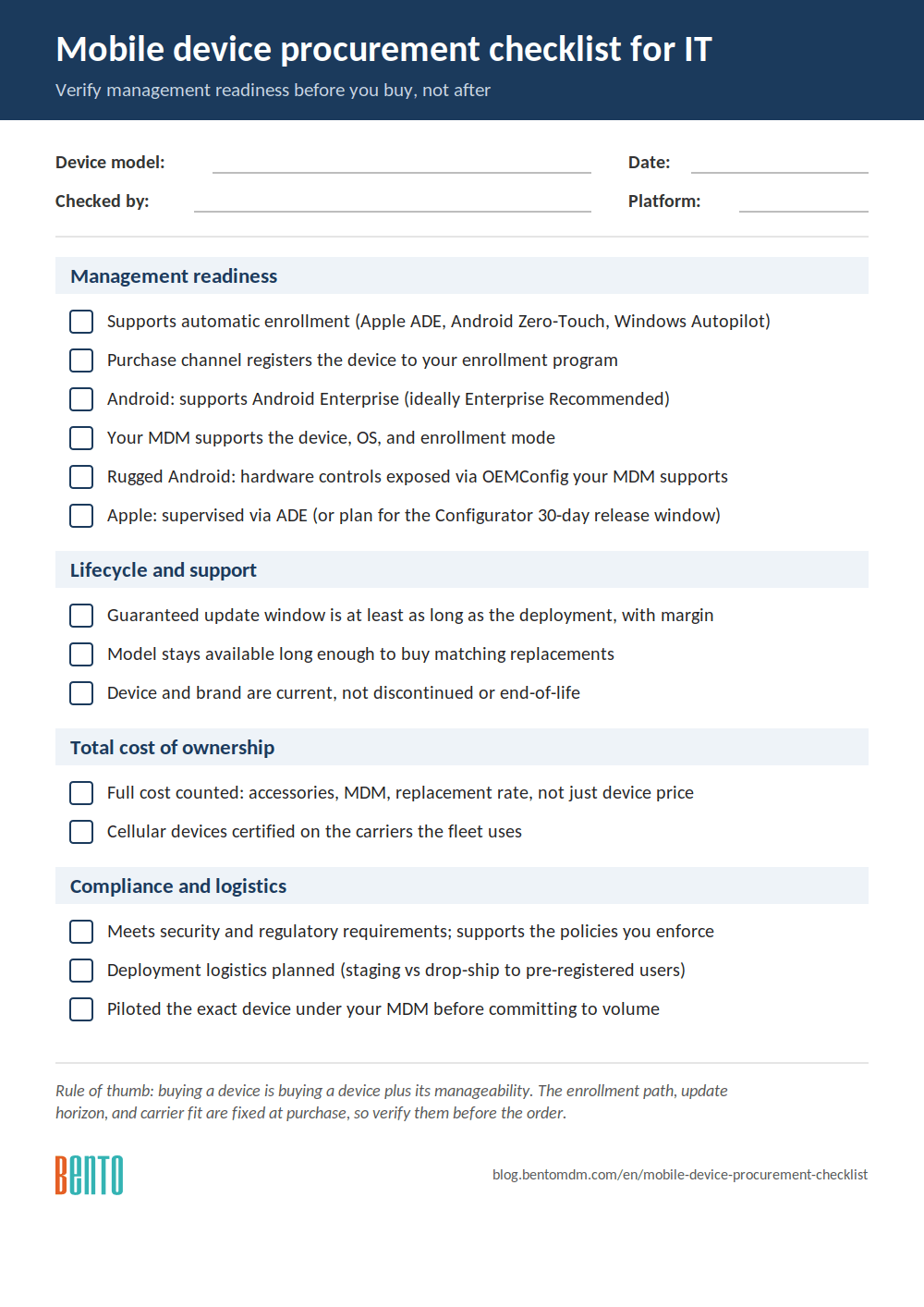
Work through the checks below before committing to a device or a fleet purchase. They are grouped into management readiness (the checks most often missed), lifecycle and support, cost of ownership, and compliance and logistics. Download the one-page version to take into a purchase review.

Download: Mobile device procurement checklist (PDF)
Management readiness
Automatic enrollment support. Confirm the device supports zero-touch, automatic enrollment into your management platform: Apple Automated Device Enrollment through Apple Business Manager for Apple devices, Android Zero-Touch or Samsung Knox Mobile Enrollment for Android, and Windows Autopilot for Windows. A device that supports one of these can ship straight to the user and arrive managed; one that does not has to be enrolled by hand, per device.
Buy through a channel that registers the device for enrollment. Automatic enrollment works only if the device is registered with your organization in the relevant program. Buy from a reseller or carrier that supports Apple Business Manager, Android Zero-Touch, or Windows Autopilot registration, and confirm they will add the devices to your account. Devices purchased through a channel that cannot register them lose the automatic enrollment benefit entirely.
Android Enterprise support (for Android). For Android, confirm the device supports Android Enterprise, and ideally that it is Android Enterprise Recommended, Google’s validation that a device meets enterprise requirements for management, security updates, and bulk enrollment. This is the clearest single signal that an Android device is fleet-ready rather than a consumer handset.
MDM platform compatibility. Confirm your specific MDM supports the device, OS, and enrollment mode you intend to use. Support varies by platform and by device class (standard, rugged, dedicated), so check the device against your MDM’s supported list rather than assuming.
OEMConfig support (for rugged and enterprise Android). For rugged or enterprise Android devices with hardware features (barcode scanners, programmable keys), confirm the device exposes those controls through OEMConfig and that your MDM supports that OEMConfig app. Without it, the MDM can enroll the device but not configure its hardware.
Supervision and ownership mode (for Apple). For Apple devices, confirm they will be supervised (as Automated Device Enrollment provides) if your deployment requires supervised-only capabilities, such as Single App Mode. One procurement-relevant detail: if devices are added to Apple Business Manager manually through Apple Configurator rather than bought through a DEP-capable reseller, the user gets a 30-day provisional period during which they can release the device from Apple Business Manager, supervision, and management. Management only becomes permanent after those 30 days. Buying through an authorized, DEP-capable reseller (so devices are assigned to your account before delivery) skips that window entirely.
Lifecycle and support
Update commitment versus deployment length. Confirm the manufacturer’s guaranteed OS and security-update window is at least as long as the planned deployment, with margin. A device that stops receiving security updates partway through its service life is an unpatched liability. Get the number in writing from the manufacturer where they publish one, and treat “current” without a stated end date as a risk. The per-vendor table below gives the current commitments.
Hardware availability and replacement. Confirm the model will remain available long enough to buy matching replacements during the deployment, and check the repair and warranty terms. A fleet standardized on a model that is discontinued six months later fragments quickly.
Not discontinued or end-of-life. Verify the device and its manufacturer are current and supported. A device from a brand that has exited the market, or a model already flagged end-of-life, is not fleet-viable regardless of price, because support and firmware may already be gone.
Total cost of ownership
Full cost, not just device price. Account for accessories, cases, the management platform, payment or peripheral hardware, and the expected replacement rate over the deployment life, not just the per-unit device price. A cheaper device that breaks more often or requires manual enrollment costs more in the long run.
Carrier and connectivity certification (for cellular devices). For devices that need cellular, confirm certification on the carriers the fleet uses, including the specific carriers where relevant, since some devices are certified on only one network and others are actively blocked by carrier whitelists. Confirm this before purchase; it is a common and expensive procurement miss for field and rugged devices.
Compliance and logistics
Security and compliance fit. Confirm the device meets any security or regulatory requirements your organization must satisfy (hardware-backed security, encryption, and any certifications required by your industry). Verify the device supports the security policies you will need to enforce through your MDM.
Deployment logistics. Confirm how the devices will be delivered, enrolled, and distributed, especially for multi-site or remote fleets. Plan whether devices ship to a central staging point or drop-ship directly to users already registered for automatic enrollment.
Pilot before volume. Before a large purchase, pilot a small number of the exact devices under your actual MDM, with your enrollment flow and apps, to confirm they enroll, configure, and comply as expected. A short pilot surfaces device-specific surprises while they are still cheap to address.
Update commitments by vendor (2026)
The single most common phrasing, that flagship phones now get “around seven years” of updates, is true for current flagships but hides two things a procurement buyer needs to know: it applies only to flagships, and the exact commitment varies by vendor and even by model year. The table below gives the current guaranteed windows so you can hold a specific model to a specific number rather than a general impression (Swappa, phone software-support by brand)
| Vendor / line | OS updates | Security updates | Notes for buyers |
|---|---|---|---|
| Apple iPhone | No fixed public number | ~6 to 7+ years in practice | Stated minimum 5 years; historically exceeds it. No committed end date |
| Google Pixel (8 and newer) | 7 years | 7 years | From US launch date; includes Pixel 9, 10 lines and the value Pixel A-series |
| Samsung Galaxy S / Z / Tab S (2024+) | 7 years | 7 years | S24 and newer only; Galaxy S23 and older are excluded from the 7-year policy |
| Samsung Galaxy A (recent mid-range) | 6 years | 6 years | Confirm the exact model; older A-series get 4 to 5 years |
| Android Enterprise Recommended (minimum bar) | Meets Google’s enterprise minimum | Regular security cadence | A validated floor for fleet buying; always check the specific model’s stated years |
Sources: Samsung 7-year policy (SammyGuru), brand support windows (Swappa), Android Enterprise Recommended devices.
On Android, Google Pixel (8 and newer) and recent Samsung Galaxy flagships now promise 7 years of OS and security updates, while mid-range and budget phones get fewer. Note that the Galaxy S23 and older did not get the 7-year policy.
Swappa, how long a phone gets updates, swappa.com
Procurement checklist quick reference
The table condenses the checklist into what to verify and why it matters, for a fast pass before a purchase order.
| Verify before buying | Why it matters |
|---|---|
| Automatic enrollment support (ADE, Android Zero-Touch, Autopilot) | Devices ship pre-managed instead of being set up by hand |
| Reseller registers devices to your enrollment program | Automatic enrollment fails if devices are not in your account |
| Android Enterprise Recommended (Android) | Signals a fleet-ready device with enterprise management and updates |
| MDM supports the device, OS, and mode | Avoids buying hardware the platform cannot manage |
| Update commitment covers the deployment length | Prevents an unpatched security gap mid-deployment |
| Carrier certification (cellular devices) | Some devices work on only one carrier or are blocked outright |
| Total cost of ownership, not device price | Cheap devices can cost more in support and replacement |
| Pilot the exact device under your MDM | Surfaces device-specific issues before volume commitment |
Procurement and device management are the same decision
The thread running through this checklist is that procurement and device management are not separate stages; the management outcome is decided at the point of purchase. The enrollment path, the update horizon, the carrier fit, and the platform compatibility are all fixed when the device is bought, and they determine how much work the fleet will require throughout its life. Treating procurement as a pure cost-and-vendor exercise is what produces fleets that are painful to run.
This is where an MDM belongs in the procurement conversation, before the purchase, not after. Knowing which devices your management platform supports, which enrollment modes it uses, and which policies you need to enforce turns the checklist above from abstract into specific. Cross-platform MDMs, including Bento MDM, manage devices across Android, iOS, macOS, and Windows, and the practical procurement question is whether a candidate device enrolls and manages cleanly in that console. Verifying that during procurement, ideally with a short pilot, is what makes the difference between a fleet that deploys itself and one that has to be built by hand. Procurement is also the front end of the wider device lifecycle, so a good buying decision pays off at every later stage through to retirement.
Frequently Asked Questions
Verify management readiness first: that the device supports automatic enrollment (Apple ADE, Android Zero-Touch, Samsung Knox Mobile Enrollment, or Windows Autopilot), that the reseller will register the devices in your enrollment program, that Android devices support Android Enterprise, and that your MDM supports the device and mode. Then check the update commitment against the deployment length, carrier certification for cellular devices, total cost of ownership, and compliance fit, and pilot the exact device under your MDM before buying in volume. The downloadable checklist above covers everything.
At least as long as the planned deployment, with margin, so a three-year deployment needs at least three years of guaranteed OS and security updates. The current numbers: Google Pixel (8 and newer) and Samsung Galaxy S/Z/Tab S from 2024 guarantee 7 years; recent Samsung Galaxy A mid-range models get 6; Apple publishes no fixed number but has historically delivered 6 to 7-plus years. Note the flagship-only nature and that older models (like the Galaxy S23) are excluded, so confirm the exact model. See the per-vendor table above.
When Apple devices are added to Apple Business Manager manually through Apple Configurator (rather than purchased through a DEP-capable reseller), the user has a 30-day window to release the device from Apple Business Manager, supervision, and management. It is not a delay before management takes effect; management is active but can be removed by the user until 30 days pass, after which it becomes permanent. Buying through an authorized reseller that assigns devices to your account before delivery avoids the window entirely.
Yes. The management outcome of a device is largely fixed at purchase: its enrollment path, update horizon, carrier fit, and platform compatibility, so the team that will manage the fleet should be involved before the buy, not handed the devices afterward. Involving device management in procurement lets them verify that a candidate device enrolls and is managed cleanly in the MDM, ideally through a short pilot, which prevents buying hardware that is expensive to run. Procurement and device management are effectively the same decision made once.

Related Articles


