Device Lifecycle Management for Mobile Fleets: From Procurement to Retirement

Every device an organization manages passes through the same six stages: planning, procurement, preparation, in-service management, refresh or repair, and retirement. The stages sound sequential and mostly are, but they overlap in practice, and each one has its own operational discipline, decision points, and cost drivers. Teams that manage the lifecycle as one connected system spend less, expose the organization to less risk, and produce cleaner audit evidence than teams that manage each stage as an unconnected event.
This post covers the six lifecycle stages as a practical operational reference for IT leaders and procurement teams responsible for mobile and endpoint fleets. It gives specific attention to procurement channels (which shape everything downstream), the Mobile Device Management platform’s role at each stage, and the retirement stage under the September 2025 NIST 800-88 Revision 2 standard, which materially changed how device disposal is documented and verified in 2026.
Three disambiguations keep the rest of the post readable. Mobile Device Management (MDM) here means the discipline of managing device fleets, not Master Data Management, which is an unrelated data-governance category. DLM, as an acronym, is used for Data Lifecycle Management (an information-governance category) and for Digital Light Management (Texas Instruments’ projector technology), which are unrelated to this post. And Device Lifecycle Management, as used here, refers to IT device fleets, not Medical Device Lifecycle Management, which is an FDA and IEC 62304 domain with different regulatory drivers and tooling.
For the wider discipline, see Mobile Device Management.
What device lifecycle management means
Device lifecycle management (DLM) is the discipline of planning, acquiring, deploying, operating, and retiring the devices an organization uses to do its work, treating them as a single connected system rather than a series of disconnected events. The scope covers laptops, desktops, smartphones, tablets, ruggedized handhelds, and any specialized hardware the organization deploys.
The MDM platform is the operational thread that runs through most of the lifecycle. It handles the transition from procurement to service (through zero-touch enrollment mechanisms such as Windows Autopilot, Apple’s Automated Device Enrollment, and Android Enterprise). It enforces configuration and security policy throughout in-service management. It supports refresh and reprovisioning workflows. And it produces the wipe-and-decommission actions that mark the beginning of retirement. Not everything in the lifecycle runs through the MDM, but most of the recurring operational work does.
The six stages of the device lifecycle
Each stage has its own decisions, its own owners, and its own tooling. The value of managing them as a system is that decisions in earlier stages heavily constrain what is possible in later stages.
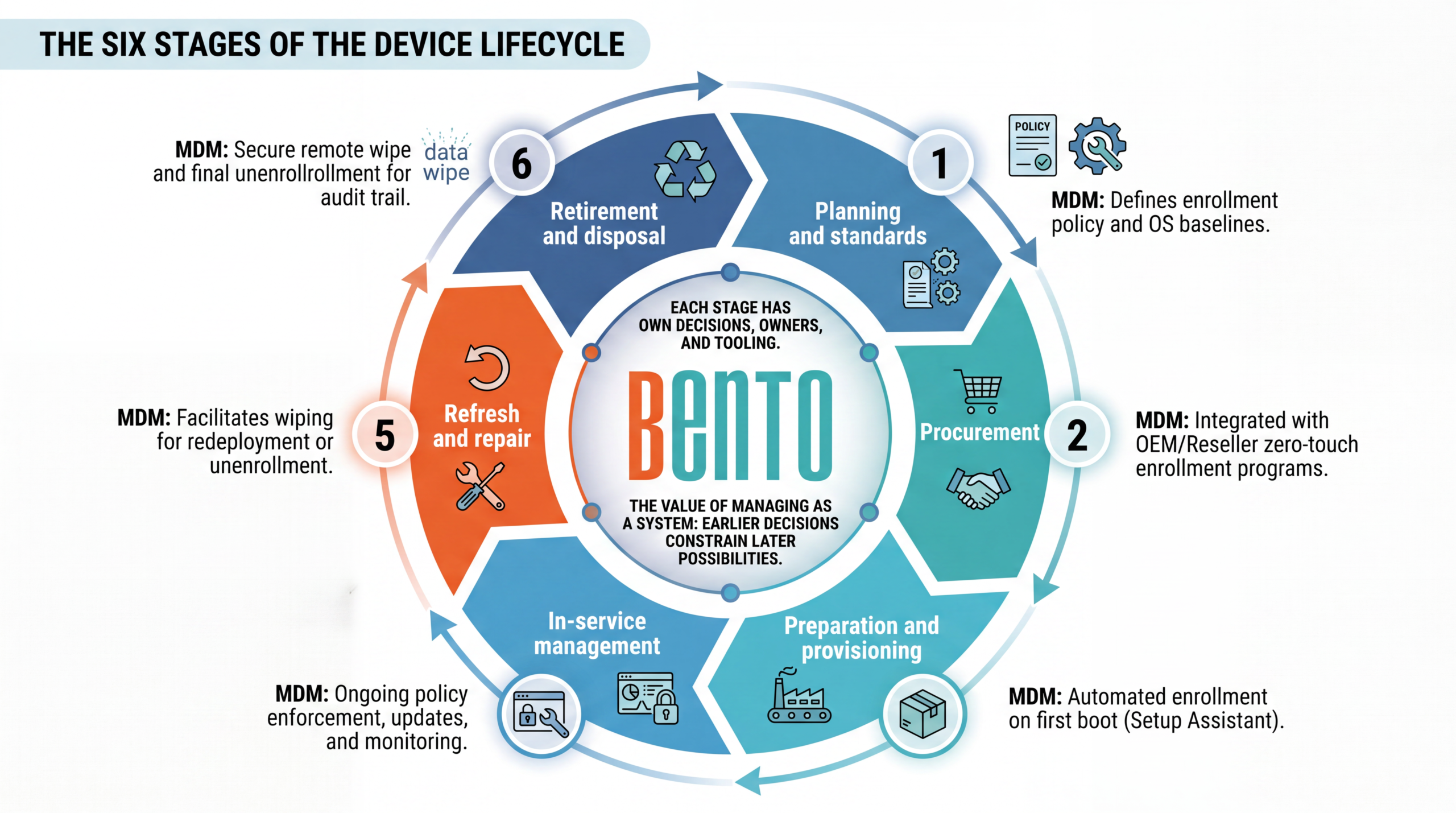
Stage 1: Planning and standards
Planning happens before the first device is bought. It covers three questions: which device standards the organization will support, which OS baselines apply, and what the refresh cadence looks like. Device standards define the specific models, configurations, and OEMs that the organization approves for purchase. Narrower standards reduce support costs, spare parts inventory, and driver management complexity. Broader standards give employees more choice but increase every downstream burden.
Refresh cadence is the single planning decision with the largest financial impact. Standard commercial hardware refreshes at three to five years. Rugged and specialized hardware refreshes every 5 to 10 years. Both are calibrated to the balance of hardware depreciation, OS support windows (Windows 11 requires specific silicon; macOS drops older Macs annually; Android and iOS both drop OS support after roughly six to seven years), and the productivity impact of older hardware. Setting a formal refresh cadence and budgeting for it is more efficient than the ad-hoc “replace when it breaks” pattern most organizations drift into.
Stage 2: Procurement
Procurement channel choice is the second decision that constrains everything downstream. Direct-from-manufacturer purchases through Apple Business Manager, Microsoft’s Autopilot-registered OEM channels (Dell, HP, Lenovo, Microsoft Surface), and Samsung Knox Mobile Enrollment for Android give the organization access to zero-touch enrollment at first boot. Reseller purchases that are properly linked to the organization’s ID (Apple’s Customer Number, Autopilot Reseller ID, Samsung Knox reseller) get the same benefit. Purchases through unlinked channels do not, and later require Apple Configurator, hardware-hash upload, or manual enrollment to bring devices into the same management posture.
Procurement also decides ownership model: buy outright, lease through a specialist, or subscribe to Device as a Service (DaaS). Each carries different cash flow, sustainability, and refresh implications, covered in more detail below.
For the Apple side of this, see Apple Business Manager and MDM.
Stage 3: Preparation and provisioning
Preparation is where the device transitions from a procurement artifact to an operational asset. This stage is where zero-touch enrollment pays off: devices registered with the MDM through Apple Business, Autopilot, or Managed Google Play arrive at the user pre-registered, and the enrollment happens automatically on first boot during Setup Assistant. Traditional bench provisioning, where IT unboxes each device, connects it to the staging network, images or configures it, and repackages it before shipping to the user, remains viable in scenarios where zero-touch does not apply (custom app configurations, air-gapped destinations, complex peripheral pairing).
Preparation is also where the MDM enrollment profile, the applied Blueprint or configuration set, the required app catalog, and the user assignment come together. Getting this right at Stage 3 means the user’s first-boot experience delivers a functional device without any Stage 4 intervention.
For Windows provisioning options, see “Windows Autopilot vs. traditional imaging.”
Stage 4: In-service management
In-service management is where most of the lifecycle’s calendar time and operational budget lives. This is the discipline the MDM exists for: enforcing security policies (encryption, screen lock, patch cadence), pushing app updates, applying configuration changes, monitoring compliance, responding to incidents, providing user support. Everything covered in a general MDM operations guide happens here.
The stage sub-divides into normal operations (routine policy enforcement, ongoing monitoring) and event response (lost or stolen device, security incident, employee role change, temporary configuration adjustments). Both are ongoing, recurring costs of the lifecycle, and both benefit from the MDM being well configured at Stage 3 rather than being reactively adjusted throughout the fleet’s life.
The controls that belong here are covered in MDM security policies.
Stage 5: Refresh and repair
Devices come in for repair when they break, and they come up for refresh when they reach the end of their planned service life. Both events create lifecycle inflection points at which the organization decides whether to repair it, refresh it with a like-for-like replacement, redeploy it to a less demanding user, or retire it. The MDM plays a role in each option: unenrolling the device from the leaving user’s account, wiping the device for redeployment, or triggering the Stage 6 retirement workflow.
A well-run refresh cycle staggers device replacements rather than replacing the whole fleet at once. Staggered refresh smooths the capex line, reduces the operational shock of mass provisioning events, and avoids the pattern of “everyone on the team gets a new laptop the same month” that creates its own support spike.
Stage 6: Retirement and disposal
Retirement is where devices leave the organization’s active fleet. The stage has two parallel workflows: the data-security workflow (ensuring no organizational data leaves the device) and the physical-disposition workflow (what happens to the hardware). Both are governed by the September 2025 NIST 800-88 Revision 2 standard, covered in detail in a dedicated section below.
The MDM handles the initial data workflow: sending a remote wipe command, unenrolling the device, revoking associated licenses, and producing an audit-trail record of the action. What happens next (physical destruction, resale, donation, or redeployment to a different scope) is downstream of the MDM but should be tracked in the organization’s IT Asset Management system to ensure the lifecycle record is complete.
For the audit-evidence side, see MDM compliance reporting.
The MDM’s role across the lifecycle
The MDM is not a device lifecycle system in itself, but it is the operational thread that runs through most recurring work. This is what the MDM does at each stage.
| Stage | MDM’s role |
|---|---|
| 1. Planning and standards | Constrains standards choice by MDM support; informs OS baseline decisions |
| 2. Procurement | Consumes procurement metadata; requires channel linkage (Apple Business, Autopilot, Knox) for zero-touch |
| 3. Preparation and provisioning | Primary tool: enrollment profile, initial configuration, Blueprint or policy application, app catalog delivery |
| 4. In-service management | Central operational tool: policy enforcement, updates, compliance monitoring, incident response |
| 5. Refresh and repair | Wipe-and-reassign workflow, license reallocation, user-to-user transitions |
| 6. Retirement and disposal | Remote wipe, unenroll, license reclamation, audit trail record of the decommissioning action |
For how devices get into management, see MDM enrollment methods.
Buying versus leasing: Device as a Service (DaaS)
The buy-versus-lease decision has become more nuanced with the growth of Device-as-a-Service offerings from HP, Lenovo, Dell, and specialist providers.
Buying outright gives the organization direct ownership, control over the refresh timeline, and the option to sell or redeploy at end of life. Capital costs are front-loaded, and the organization carries the burden of refresh planning, warranty management, and disposal. This model fits organizations with stable device budgets and mature IT operations.
Device as a Service shifts to an operating expense model with a monthly per-device fee that typically bundles hardware, warranty support, extended service coverage, and often lifecycle management services. HP Managed Device Services, Lenovo Device as a Service, and Dell APEX PC as a Service are the major offerings. DaaS fits organizations that value a predictable operating expense line, want to avoid upfront hardware capex, and appreciate the built-in refresh cadence.
The tradeoff: DaaS tends to be more expensive on a five-year cost-of-ownership basis than outright purchase but reduces operational burden, particularly for organizations that struggle to maintain a mature refresh discipline on their own. For fleets that already have strong lifecycle discipline, DaaS often costs more than it saves. For fleets that do not, DaaS often costs less than the operational drag of the alternative.
NIST 800-88 Rev. 2 and device retirement in 2026
Device retirement in 2026 is governed by NIST Special Publication 800-88 Revision 2, which NIST published on September 26, 2025 and which replaces the previous Revision 1 from December 2014. Rev. 2 modernizes the sanitization framework for the storage technologies that dominate mobile fleets: SSDs, NVMe drives, embedded flash, and virtualized storage.
Clear, Purge, and Destroy
Rev. 2 preserves the three-category framework of the earlier revision.
Clear uses logical techniques (software-based overwrite) to sanitize data in all user-addressable storage locations. It protects against simple, non-invasive data recovery techniques and is appropriate for media that will be reused within the same security environment (for example, a laptop moving from one internal user to another).
Purge applies techniques that render data recovery infeasible even using state-of-the-art laboratory techniques. Purge methods include Cryptographic Erase (CE, the current default for SSDs with hardware encryption), block erase, and degaussing (still valid for magnetic media, ineffective for flash). Purge is appropriate for media leaving organizational control when physical destruction is not required, and is the current minimum standard for most sensitive business data.
Destroy renders the storage medium physically unusable through disintegration, pulverization, melting, or incineration. It is required for the highest-sensitivity data classifications and for failed drives with no future value. Shredding remains valid but requires increasingly small shred sizes as storage density grows.
What changed in Rev. 2
Rev. 2 introduces several changes that IT teams need to know about.
IEEE 2883-2022 becomes the technique reference. Rev. 2 removes device-specific sanitization instructions and instructs organizations to use IEEE 2883-2022 (the international storage sanitization standard) for approved sanitization processes per media type. This is a program-focused, risk-based approach rather than a device-by-device instruction set.
Standard overwrite no longer satisfies Purge for SSDs. SSDs use wear leveling, over-provisioning, and block remapping, all of which leave data in inaccessible areas that overwrite cannot reach. For SSDs, Purge now requires verified Cryptographic Erase (assuming AES-256 controller-level encryption was active from device enrollment), block erase, or physical destruction.
DoD 5220.22-M is deprecated. The three-pass or seven-pass overwrite protocol widely referenced in older IT policies no longer satisfies NIST SP 800-171 Practice MP.L2-3.8.3, which is the CUI-handling requirement for defense contractors. Organizations that still reference DoD 5220.22-M in their disposal procedures should update to NIST 800-88 Rev. 2, aligned with the applicable data classification.
Sanitization is now a program discipline, not a device task. Rev. 2 emphasizes program governance: matching sanitization method to FIPS 199 data classification, per-device method selection at intake, and serial-number-level chain of custody rather than batch certificates.
Documentation and chain of custody
Under Rev. 2, a “wiped” status is not sufficient audit evidence. Auditors expect a Certificate of Sanitization per device with the following elements: device details (manufacturer, model, serial number), sanitization methodology (specific technique and tool version), verification results (how the sanitization was verified), and chain of custody (personnel who performed and verified the sanitization, with dates, times, and locations).
The MDM’s remote wipe record is not the same as a Certificate of Sanitization. The MDM record documents that a wipe command was sent and confirmed applied. The Certificate of Sanitization documents the underlying sanitization method used against the specific media type at the required security level with independent verification. For most organizations retiring commercial-grade hardware with sensitive data, this means partnering with a certified IT Asset Disposition (ITAD) provider (typically holding NAID AAA certification) rather than relying on the MDM wipe alone.
Regulatory frameworks that reference NIST 800-88 include HIPAA (as an accepted safeguard for PHI disposal), PCI DSS (for cardholder data), FISMA (for federal agencies), CMMC 2.0 (for defense contractors), and GLBA and SOX for financial data. The CMMC picture is in transition in 2026: Phase 1, requiring self-assessment against NIST SP 800-171, has applied to relevant contracts since November 10, 2025, but on July 13, 2026 the Department of Defense suspended the Phase 2 third-party certification requirement (previously set for November 10, 2026) and opened a 60-day program review, with the Defense Industrial Base estimated at roughly 220,000 to 300,000 companies. The underlying obligation to protect controlled unclassified information, and therefore to dispose of it to standard, remains in force regardless of the certification pause. Organizations subject to multiple frameworks typically consolidate on a NIST 800-88-aligned disposal program that satisfies all of them.
Sustainability and e-waste in the modern lifecycle
Device disposal in 2026 has a sustainability dimension that adds compliance and reputational cost to the classical data-security concern.
The Basel Convention governs international movement of hazardous waste, including e-waste, and its e-waste amendments came into force on January 1, 2025. Organizations disposing of devices across borders need to confirm their ITAD partner’s cross-border compliance.
The EU WEEE Directive (Waste from Electrical and Electronic Equipment) mandates that organizations operating in the EU collect, treat, and recycle e-waste. WEEE compliance is handled by the ITAD partner, but responsibility remains with the original owner.
The EU Corporate Sustainability Reporting Directive (CSRD) requires in-scope organizations to disclose environmental impact, including e-waste generated. The scope and timing narrowed sharply in 2025: the EU’s stop-the-clock directive delayed the next reporting wave to financial year 2027, and the Omnibus simplification package proposed removing roughly 90 percent of companies from scope. Organizations should confirm whether they remain in scope under the revised thresholds rather than assuming the original timeline. In the US, the SEC climate disclosure rules that once looked imminent were stayed in April 2024, never took effect, and the SEC proposed rescinding them in 2026, so they are not a current reporting obligation.
Circular economy patterns matter for organizations with sustainability targets. Refurbishing devices for reuse, extending refresh cycles where hardware supports it, and choosing repairable and modular designs at procurement all reduce the environmental impact of the device lifecycle. The refurbished-device market is mature enough that some organizations buy refurbished for non-mission-critical scenarios.
ITAD partner selection matters for both compliance and sustainability. Key selection criteria: NAID AAA certification for data destruction, R2v3 or e-Stewards certification for responsible recycling, cross-border compliance if relevant, insurance coverage on data breach liability during transit, and reporting quality that supports the organization’s sustainability disclosures.
Common lifecycle mistakes
Certain mistakes recur across mobile fleet lifecycle deployments. Knowing them prevents most of them.
No formal refresh cadence. Organizations that replace devices when they break rather than on schedule tend to spend more overall, produce worse user experience, and struggle to plan capex. A published refresh cadence (three to five years for commercial, five to ten for rugged) is the correction.
Procurement disconnected from MDM enrollment. Devices bought through channels not linked to the organization’s zero-touch enrollment program (Apple Business, Autopilot Reseller ID, Samsung Knox) require manual enrollment later, at meaningful cost. Procurement policy should require linked channels for standard hardware.
No retirement workflow. Devices leaving the fleet through user departures, theft, loss, or breakage often disappear from the inventory without a clean disposal record. The correction is a required off-boarding workflow that ties the MDM’s decommissioning action to the IT Asset Management record and, where sensitive data was on the device, to a Certificate of Sanitization from an ITAD partner.
Relying on the MDM wipe as evidence of sanitization. The MDM wipe is not the same as NIST 800-88 sanitization. For any device that has carried sensitive data and is leaving organizational control, an ITAD partner’s Certificate of Sanitization serves as audit-defensible evidence. Organizations that stopped at the MDM wipe often surface this gap in an audit.
Ignoring NIST 800-88 Rev. 2’s SSD implications. The overwrite procedures that used to satisfy the older revision no longer do so for the SSDs and NVMe drives in nearly every modern device. Update disposal procedures accordingly.
Not planning for sustainability disclosures. Organizations that remain in scope for CSRD under its revised thresholds, or that report under voluntary frameworks, need lifecycle data for e-waste and circular economy metrics. Building that reporting into the lifecycle from the start is cheaper than reconstructing it later, but confirm current scope first rather than building for rules that have narrowed or been withdrawn.
Which lifecycle approach fits your fleet?
Match the approach to the fleet’s scale and operational maturity.
| Fleet profile | Recommended approach |
|---|---|
| Small (under 100 devices), mature IT | Outright purchase, manual lifecycle discipline, ITAD partner for retirement |
| Small, limited IT resources | Device as a Service (HP, Lenovo, or Dell APEX) to outsource lifecycle burden |
| Mid-market (100 to 2,000 devices) | Hybrid: outright purchase for standard hardware with in-house lifecycle discipline, DaaS for specialized scenarios (executives, contractors) |
| Enterprise (2,000+ devices) | Formal lifecycle program with dedicated ownership, MDM-integrated workflows, tier-1 ITAD partner |
| Regulated (HIPAA, PCI, CMMC) | NIST 800-88 Rev. 2 aligned program, NAID AAA ITAD partner, per-device Certificate of Sanitization required |
| Sustainability-focused | Extended refresh cycles where hardware supports it, refurbishment programs, R2v3 or e-Stewards certified ITAD partner, disclosure-aligned reporting where in scope |
For a broader shortlist, see Best MDM Solutions for Small and Mid-Sized Teams.
Cross-platform MDMs, including Bento MDM, manage the in-service and retirement stages of the mobile fleet lifecycle across Android, iOS, macOS, and Windows. The MDM handles ongoing configuration, security policy enforcement, compliance monitoring, and the initial decommissioning wipe. It does not replace the procurement channel linkage, the ITAD partner relationship, or the Certificate of Sanitization documentation, all of which sit outside the MDM’s scope. The correct picture is the MDM as the operational thread through the middle of the lifecycle, with procurement and disposal partners at either end.
Frequently asked questions
Device lifecycle management (DLM) is the discipline of planning, acquiring, deploying, operating, and retiring the devices an organization uses, treating them as a single connected system. The lifecycle covers six stages: planning and standards, procurement, preparation and provisioning, in-service management, refresh and repair, and retirement and disposal. Mobile Device Management is the operational thread that runs through most stages, but it is not the whole discipline.
IT Asset Management (ITAM) is the broader discipline that tracks all IT assets (software licenses, hardware, cloud subscriptions, services). Device Lifecycle Management is the subset focused specifically on the operational lifecycle of devices. In practice, DLM outputs (procurement records, MDM enrollment status, sanitization certificates) feed into the ITAM system. Organizations with mature IT operations run both, with clear ownership of what belongs in each.
Device as a Service is a subscription model where an organization pays a monthly per-device fee that bundles hardware, warranty and support services, and often lifecycle management services. HP Managed Device Services, Lenovo Device as a Service, and Dell APEX PC as a Service are the largest providers. DaaS shifts the cost model from capital expense to operating expense and outsources lifecycle burden, at a higher five-year total cost of ownership than outright purchase in most scenarios.
The standard commercial refresh cadence is three to five years for standard laptops, tablets, and smartphones, calibrated to the balance of hardware depreciation, OS support windows, and productivity impact. Ruggedized and specialized hardware refreshes at five to ten years. Organizations with sustainability targets often push commercial refresh to the longer end of that range where hardware supports it.
NIST Special Publication 800-88 is the US federal standard for media sanitization, defining three sanitization categories (Clear, Purge, Destroy) corresponding to data sensitivity levels. Revision 2 was published September 26, 2025, and replaces the previous Revision 1 from 2014. NIST 800-88 is the accepted reference for HIPAA, PCI DSS, FISMA, CMMC, GLBA, and SOX-relevant device disposal, so nearly every organization retiring devices with sensitive data is expected to align with it.
No. A factory reset or an MDM remote wipe removes data from the operating system’s perspective but does not satisfy the NIST 800-88 Purge or Destroy requirements for modern SSDs. For any device that carried sensitive data and is leaving organizational control, a certified IT Asset Disposition (ITAD) partner’s Certificate of Sanitization is the audit-defensible evidence. The MDM wipe is a necessary first step, not the whole workflow.
Clear uses logical software-based overwrite techniques appropriate for media staying within the same security environment (for example, a laptop moving between internal users). Purge applies more rigorous techniques (Cryptographic Erase, block erase, or degaussing) that resist state-of-the-art laboratory recovery methods, making them appropriate for media leaving organizational control. Destroy renders the storage physically unusable through disintegration, pulverization, melting, or incineration, required for highest-sensitivity data or failed drives with no reuse value. Under Rev. 2, Purge is the minimum for most sensitive business data, and for SSDs the Purge techniques are limited to Cryptographic Erase, block erase, or physical destruction.


Related Articles


