Windows Autopilot vs Traditional Imaging: Which Provisioning Model should IT use?

Windows PC provisioning in 2026 is a three-model decision, not a two-model decision. The first model is Windows Autopilot classic, which has been Microsoft’s zero-touch enrollment story since 2017. The second is Windows Autopilot device preparation, a re-architected next-generation approach that Microsoft introduced in 2024 and continues to expand. The third is traditional Windows imaging, which has evolved into a smaller footprint but has not disappeared. Most mid-market and enterprise IT teams end up running two or all three of these models in parallel, matched to specific device scenarios.
This post covers what each model actually does in 2026, the specific scenarios where each one fits, how they coexist in the same organization, and the practical migration path from an imaging-heavy stack toward a cloud-provisioning stack. It is written from the perspective that this is a real, current decision most Windows IT teams face right now, not a philosophical debate about legacy versus modern.
Three quick disambiguations. Mobile Device Management (MDM) here refers to the discipline of managing device fleets, including Windows PCs, not to Master Data Management. Windows Autopilot is a Microsoft provisioning service, not a Microsoft MDM (that is Intune, though the two integrate tightly). And “traditional imaging” here means the on-premises task-sequence and reference-image workflow historically used by Windows IT, not the broader concept of disk imaging for backup or forensics.
For the wider discipline, see Mobile Device Management.
What Windows Autopilot is: two versions in 2026
Autopilot is Microsoft’s cloud-based Windows provisioning service. It runs during the Out-of-Box Experience (OOBE) when a new or reset device first connects to the internet. The device contacts Microsoft’s Autopilot service, discovers that it belongs to an organization, and enrolls itself into that organization’s Intune tenant with the assigned configuration. There is no imaging step. There is no on-premises task sequence. The device provisions itself from the cloud during first boot.
In 2026, “Windows Autopilot” refers to two related but distinct products, and understanding the split is essential to picking the right one.
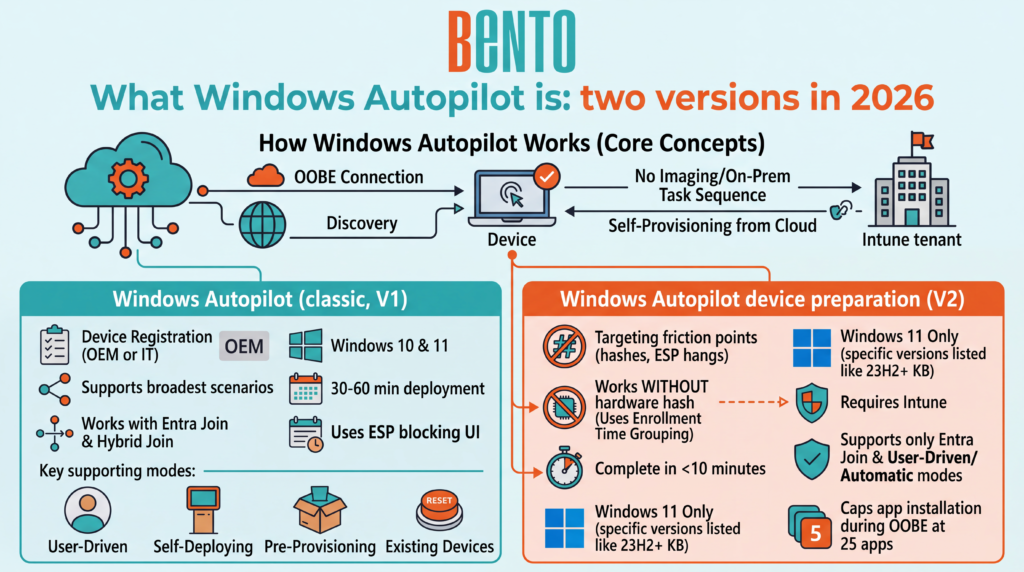
Windows Autopilot (classic, V1)
Classic Autopilot has been the default since 2017. It requires device registration in the Autopilot service via one of two paths: the OEM registers the device at the point of purchase (Dell, HP, Lenovo, Microsoft Surface, and other Autopilot-participating OEMs offer this), or IT manually uploads the device’s hardware hash upon receipt. Once registered, the Autopilot service recognizes the device at OOBE and applies the assigned Autopilot profile.
Classic Autopilot supports the broadest set of deployment scenarios. It works with both Microsoft Entra Join and Microsoft Entra Hybrid Join. It offers User-Driven mode (the default), Self-Deploying mode (for kiosks and shared devices), Pre-Provisioning mode (formerly called White Glove, where IT pre-stages a device before shipping to the user), and Existing Devices mode (for reset-and-reprovision workflows on already-deployed hardware). It works on Windows 10 and Windows 11. Deployment typically takes 30 to 60 minutes and drives through the Enrollment Status Page (ESP), which is Microsoft’s OOBE-blocking progress UI.
Windows Autopilot device preparation (V2)
Autopilot device preparation, which Microsoft also refers to internally as V2 or “next-gen Autopilot,” was introduced in 2024 as a re-architecture rather than a version bump. It targets the friction points that made classic Autopilot painful at scale: hardware hash management, ESP hangs, and the fragility of the app installation sequencing.
Device preparation works without a hardware hash. Instead, it uses Enrollment Time Grouping, a mechanism in which the device is added to a designated Entra security group at the time of enrollment, and the applications, scripts, and policies assigned to that group are delivered immediately. Deployment typically completes in under 10 minutes on Windows 11 hardware.
The tradeoff is scope. Device preparation supports Microsoft Entra Join only, not Hybrid Join. It supports only User-Driven and Automatic (for Windows 365) modes, not Self-Deploying or Pre-Provisioning. It requires Windows 11 version 22H2 with KB5035942 or later, or Windows 11 version 23H2 with KB5035942 or later, or Windows 11 24H2 or later. It requires Microsoft Intune specifically; non-Microsoft MDM support has been announced but is not shipped in the initial release. It caps app installation during OOBE at 25 apps (raised from an earlier lower ceiling), and only Line-of-Business (LOB), Microsoft Store (WinGet-supported), Microsoft 365, Win32, and Enterprise App Catalog apps are supported.
How to think about the two versions together
Microsoft has explicitly committed to running both classic Autopilot and Autopilot device preparation in parallel, with no deprecation timeline for the classic version. Both continue to receive updates. Both target different scenarios well. Any single device runs one or the other, not both. If both profiles are assigned to the same device, the classic Autopilot profile takes precedence, and Autopilot device preparation will not run until the device is deregistered from classic.
For teams new to Autopilot in 2026, the practical starting question is: are your target devices Windows 11 on Entra Join (not Hybrid), managed by Intune, and does your deployment fit within the User-Driven or Automatic modes? If yes to all four, Autopilot device preparation is simpler and faster. If any answer is no, classic Autopilot remains the fit.
For managing the devices after provisioning, see Windows device management.
What traditional Windows imaging means today
Traditional Windows imaging in 2026 has a smaller footprint than it did in 2018, and one of its long-standing pillars has now been retired. The stack has consolidated around a shorter list of options.
Microsoft Deployment Toolkit (MDT) is retired. Microsoft retired MDT on January 6, 2026. It receives no further updates, fixes, or security patches, and its download packages may be removed from official channels. Existing installations continue to function, but MDT will not be updated for future Windows releases, so deployments built on it face growing compatibility and security risk as new Windows and ADK versions ship. Microsoft’s own guidance is to transition MDT workflows to Windows Autopilot or Configuration Manager OSD. New imaging deployments should not standardize on MDT, and teams still running it should treat migration off it as a planned project rather than an open-ended hold.
Configuration Manager Operating System Deployment (Configuration Manager OSD) is the enterprise-grade task-sequence platform, part of Microsoft Configuration Manager (formerly SCCM, renamed Microsoft Configuration Manager with version 2303 in 2023 and now part of the Microsoft Intune family). It handles imaging at scale, integrates with the broader Configuration Manager infrastructure, and supports both boot-media-driven imaging and PXE boot. Microsoft confirms that OSD remains a fully supported option for organizations with on-premises infrastructure and is now the primary supported on-premises path following the retirement of MDT. Organizations that already run Configuration Manager for other reasons use its OSD component as a natural fit.
Windows Deployment Services (WDS) is being progressively wound down. Microsoft no longer invests in new WDS capabilities, and its current guidance points teams to Configuration Manager or third-party tools rather than to the now-retired MDT. Microsoft has also documented that boot.wim images based on the Windows 11 24H2 ADK are not supported for WDS network boot, and an April 2026 change removes WDS hands-free deployment by default. WDS installations still exist in production, but new deployments should not standardize on it.
Third-party imaging platforms, including SmartDeploy, Ivanti Endpoint Manager, KACE, and (in retreat) the legacy Symantec Ghost, target the mid-market where Configuration Manager is overkill and the retirement of MDT has left a gap for a supported, lower-overhead imaging tool. These tools tend to focus on ease of image maintenance, driver management, and network deployment.
Every traditional imaging approach follows the same architectural pattern: build a reference image (or a scripted install), capture it or configure the task sequence, and deploy it to target devices via boot media, PXE, or an over-the-network task sequence. The image itself is the primary artifact IT maintains.
How the three models compare across ten dimensions
The comparison matters most in the specific dimensions where teams get stuck when making the decision.
| Dimension | Autopilot classic | Autopilot device preparation | Traditional imaging |
|---|---|---|---|
| Hardware registration required | Yes (hardware hash or OEM) | No | No |
| Windows OS support | Windows 10, Windows 11 | Windows 11 only (22H2 KB5035942+, 23H2 KB5035942+, 24H2+) | Windows 10, Windows 11 |
| Identity model | Entra Join or Hybrid Join | Entra Join only | Any (workgroup, AD, Entra) |
| MDM requirement | Intune or third-party MDM | Intune only (currently) | None strictly, though usually paired |
| Time to productive device | 30 to 60 minutes | Under 10 minutes | 15 to 45 minutes on-network |
| Bandwidth requirement | High (cloud installs) | Moderate (Entra-optimized) | Low if LAN-based |
| Offline capability | No | No | Yes |
| Remote-worker fit | Strong | Strongest | Weak |
| Direct-ship-to-user | Yes | Yes | No |
| Legacy app/driver depth | Moderate | Moderate (25-app OOBE cap) | Highest |
For the wider baseline, see the MDM capabilities checklist.
When traditional imaging still makes sense
Imaging keeps its place in five specific scenarios, and cloud-provisioning true believers underweight these more often than not. In every case below, the supported on-premises path in 2026 is Configuration Manager OSD or a third-party imaging tool, since MDT is retired.
Air-gapped and highly restricted networks. Devices that live behind a network barrier without unrestricted internet access cannot rely on cloud provisioning. Defense, government, healthcare in specific settings, and financial trading floors sometimes fall here. Imaging with local media is often the only viable path.
Legacy line-of-business apps with complex install sequences. Some LOB apps require specific installation order, service dependencies, or custom registry work that cloud provisioning cannot cleanly reproduce within the OOBE window. A well-tested reference image bakes those constraints in.
High-volume same-day provisioning at fixed sites. A school with 500 laptops that need to be provisioned in a weekend by a two-person team on a wired LAN gets a better result from PXE-driven task sequences than from waiting on cloud provisioning for each device.
Regulated environments requiring bit-for-bit reproducibility. Some compliance regimes require the ability to reproduce a specific known-good image on request. Imaging supports this cleanly; cloud provisioning is harder to prove reproducible in the same way.
Windows deployment on hardware that is not on the Autopilot-participating OEM list. Devices that will not be registered by an OEM, and where hardware-hash capture is impractical, may be better provisioned through imaging than through the manual-hash Autopilot workflow.
When Windows Autopilot classic is the right fit
Classic Autopilot is the right fit when the deployment scenario needs one or more capabilities that Autopilot device preparation does not yet cover.
Windows 10 devices. Any device that is not on Windows 11 stays with classic. Microsoft is not backporting device preparation to Windows 10. Note that Windows 10 reached end of support on October 14, 2025, so any remaining Windows 10 fleet is itself on a migration clock.
Entra Hybrid Join. Organizations that maintain on-premises Active Directory alongside Entra ID and need devices joined to both use Hybrid Join, which classic supports and V2 does not.
Pre-Provisioning (formerly White Glove) or Self-Deploying modes. If IT or a partner needs to pre-stage a device before it reaches the user, or if the device is a kiosk or a shared-use scenario that needs to enroll without a user account, classic covers both cases. Device preparation does not, at least not yet.
Existing Devices scenarios. Reset-and-reprovision workflows for devices already deployed run cleanly through classic Autopilot’s Existing Devices mode. Device preparation is more focused on new-device flows.
Non-Microsoft MDM. Organizations using an MDM other than Intune (VMware Workspace ONE, and cross-platform MDMs like Bento MDM, Hexnode, or ManageEngine) can use classic Autopilot when the MDM vendor has implemented the Autopilot enrollment integration. Autopilot device preparation currently supports Intune only. Confirm the exact integration depth with the vendor rather than assuming any MDM works automatically.
For how devices get into management, see MDM enrollment methods.
When Autopilot device preparation is the right fit
Device preparation is the right choice when the deployment meets all four constraints (Windows 11, Entra Join, Intune-managed, User-Driven or Automatic modes) and the organization values a simpler workflow, faster deployment, and cleaner reporting.
Remote-first workforces. A company hiring 100 new employees per quarter, shipping devices directly from the OEM to employees’ homes, benefits significantly from sub-10-minute deployment and the no-hardware-hash workflow. The friction of the classic Autopilot hash-collection process disappears.
Cloud-first organizations without on-premises Active Directory. Companies that never adopted or have retired Active Directory in favor of Entra ID are the natural fit. Hybrid Join is not needed. Device preparation’s Entra-Join-only constraint is not a constraint at all.
Teams that got burned by the classic Autopilot app’s installation fragility. The 25-app OOBE limit is not a serious restriction for most organizations; classic Autopilot’s more permissive limit came with the trade-off of frequent ESP hangs due to poor app installation sequencing. Device preparation’s cleaner sequencing produces a more predictable outcome.
Windows 365 Cloud PC deployments. Device preparation’s Automatic mode is specifically designed for Cloud PC provisioning at scale, and it integrates cleanly with the Cloud PC provisioning policy.
The coexistence pattern most enterprises actually run
The framing of “Autopilot versus imaging” implies a binary decision. In practice, most mid-market and enterprise IT teams run two or three of the models in parallel, matched to the scenarios each fits best.
The typical enterprise pattern in 2026 looks something like this: classic Autopilot for hybrid-joined devices and for pre-provisioned executive laptops; Autopilot device preparation for new hires on Windows 11 direct-shipped from the OEM; Configuration Manager OSD for on-site kiosk builds, developer workstations with heavy custom configuration, and any Windows 10 devices still in the fleet. Each model owns the scenarios it fits, and none of them is asked to do work it is bad at.
This coexistence is not a transition problem to be solved. It is a stable long-term architecture. Microsoft has explicitly said classic Autopilot and device preparation will continue in parallel. Traditional imaging via Configuration Manager OSD remains supported in scenarios where it is genuinely the correct tool. Trying to force every device onto a single model produces more friction than it saves.
A practical migration path from imaging to Autopilot
Organizations moving from an imaging-heavy stack toward cloud provisioning benefit from a phased migration rather than a big-bang cutover. The phases below reflect what actually works in the field. Teams still on MDT have an added reason to start: MDT is retired and unsupported, so its scenarios need a destination regardless.
Phase 1: Assess and pilot (weeks 1 to 6). Inventory the current provisioning landscape: how many devices, from which OEMs, running what apps and configurations. Flag any MDT-based workflows specifically, since those are now running on retired tooling. Identify a pilot group (typically new hires in a specific team or region) where cloud provisioning risk is contained. Set up an Autopilot classic pilot if the fleet is on Windows 10 or Hybrid Join, or Autopilot device preparation if Windows 11 and Entra Join. Register a small pilot batch of devices. Run through the OOBE flow with real users.
Phase 2: Coexistence (weeks 6 to 20). Run cloud provisioning for the pilot scenarios that fit, keep Configuration Manager OSD imaging for everything else, and document which scenarios go which way. Update the procurement process to include OEM registration for new orders in the pilot scope. Train the help desk on the new OOBE flow and the specific failure modes to expect. Build the reporting habit: track deployment success rates, time to productive device, and support ticket volume against both paths.
Phase 3: Expand and refine (weeks 20 to 40). Move additional scenarios from imaging to cloud provisioning as confidence grows. Prioritize migrating any remaining MDT workflows onto either Autopilot or Configuration Manager OSD, since MDT will not receive compatibility updates for future Windows releases. Refine the app packaging and script inventory delivered by provisioning. Address the edge cases that surface in coexistence. This is the phase where the shape of the long-term architecture becomes visible: which scenarios stay on imaging, which move to classic Autopilot, which move to device preparation.
Phase 4: Retire what no longer fits (week 40 onward). Decommission imaging infrastructure for scenarios that have fully moved to cloud provisioning, and remove any retired MDT infrastructure entirely. Update runbooks and documentation. Retain Configuration Manager OSD infrastructure only for the scenarios where it remains the right tool, and treat those scenarios as stable rather than legacy.
The whole migration typically takes six to twelve months for a mid-market organization and twelve to twenty-four months for an enterprise with legacy dependencies. Trying to compress the timeline usually causes rework.
Once provisioned, harden the fleet with MDM security policies.
Which provisioning approach fits your fleet?

Match the choice to the fleet composition and the specific deployment scenarios.
| Fleet profile | Recommended approach |
|---|---|
| Small, all-Windows-11, Intune-managed, remote-first | Autopilot device preparation as primary; classic for edge cases |
| Mid-market, mixed Windows 10 and 11, Entra Join | Classic Autopilot as primary; device preparation as pilot for new W11 devices |
| Enterprise with on-premises Active Directory (Hybrid Join) | Classic Autopilot; device preparation only for Entra-Join subset |
| Cross-platform fleet (Windows plus Mac plus mobile) | Cross-platform MDM such as Bento MDM, Microsoft Intune, or Hexnode with Autopilot on the Windows side |
| Regulated or air-gapped environment | Traditional imaging (Configuration Manager OSD) primary; Autopilot where connectivity permits |
| Fleet with heavy custom LOB app requirements | Configuration Manager OSD for scenarios needing custom install sequences; Autopilot for standard-configuration devices |
| Windows 365 Cloud PC-first organization | Autopilot device preparation Automatic mode for Cloud PC provisioning |
For a broader shortlist, see Best MDM Solutions for Small and Mid-Sized Teams.
Cross-platform MDMs, including Bento MDM, manage Windows devices through the same CSP-based mechanisms that Intune uses and integrate with classic Windows Autopilot for zero-touch provisioning. The differentiation at the provisioning layer is the depth of Autopilot integration, the quality of the OOBE flow customization that the MDM supports, and how cleanly the console handles both Windows-specific and cross-platform workflows for teams that manage more than just Windows. The correct evaluation is a pilot on real hardware, not a paper feature comparison.
Frequently asked questions
Windows Autopilot is Microsoft’s cloud-based Windows provisioning service. It runs during the Out-of-Box Experience when a new or reset device first connects to the internet, contacts the Autopilot service, and enrolls itself into the organization’s Intune tenant with the assigned configuration. In 2026, “Windows Autopilot” actually refers to two related products: the original Windows Autopilot (classic, V1) and the newer Windows Autopilot device preparation (V2), each with different capabilities and constraints.
Classic Autopilot requires device registration through a hardware hash upload or OEM registration, supports Windows 10 and 11, works with both Entra Join and Entra Hybrid Join, and covers four deployment modes (User-Driven, Self-Deploying, Pre-Provisioning, Existing Devices). Device preparation eliminates the hardware hash requirement using Enrollment Time Grouping, supports Windows 11 only, requires Entra Join (not Hybrid), supports only User-Driven and Automatic modes, requires Microsoft Intune specifically, and deploys in under 10 minutes on eligible hardware.
Autopilot itself is included with the underlying licensing that most organizations already have: Microsoft Intune, Microsoft 365 Business Premium, or Microsoft 365 E3 or E5. There is no separate Autopilot license. What is required is Microsoft Entra ID P1 or higher and Microsoft Intune, both of which are included in the listed Microsoft 365 tiers.
For many scenarios, yes. For all scenarios, no. Air-gapped networks, legacy LOB apps with complex installation sequences, high-volume same-day fixed-site provisioning, and regulated environments requiring bit-for-bit image reproducibility remain scenarios in which traditional imaging is the right tool. In 2026, the supported on-premises imaging path is Configuration Manager OSD, since MDT is retired. Most mid-market and enterprise organizations run Autopilot and imaging in parallel, matching each to the scenarios it fits best.
Autopilot is a provisioning service (enrolling devices into management at first boot). Intune is a Mobile Device Management platform (managing devices on an ongoing basis, pushing policies, enforcing compliance, and distributing apps). Autopilot uses Intune as its target management platform. The two are complementary parts of the same Microsoft management stack, not alternatives.
Classic Windows Autopilot can work with a non-Microsoft MDM when that vendor has implemented the Autopilot enrollment integration. Microsoft documents Autopilot as requiring an MDM service such as Microsoft Intune, and defers non-Intune configuration to the vendor, so support depends on the specific MDM. Cross-platform MDMs including Bento MDM, Hexnode, ManageEngine, and VMware Workspace ONE integrate with classic Autopilot for Windows provisioning; confirm the exact integration depth with the vendor. Autopilot device preparation, as of 2026, supports Microsoft Intune only, though Microsoft has publicly stated non-Microsoft MDM support is planned.
Enrollment Time Grouping is the mechanism device preparation uses instead of hardware hash pre-registration. When a user signs in to a new device during OOBE and belongs to a target user group with an assigned device preparation policy, the Intune Provisioning Client automatically adds the device to a designated Entra security group at that moment. The applications, scripts, and policies assigned to that group are then delivered immediately. This is what enables the sub-10-minute deployment and eliminates the need for hardware hash management.


Related Articles


